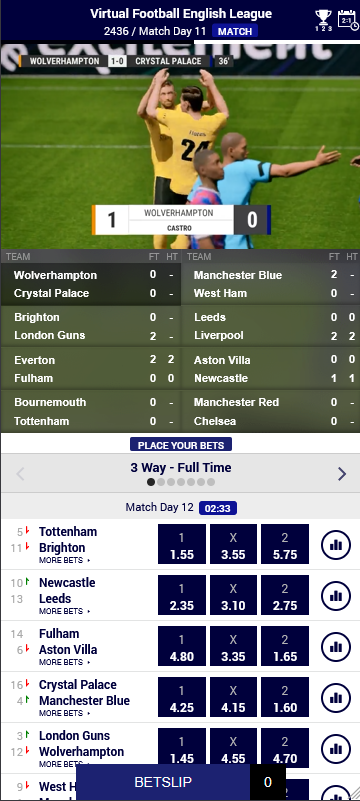
Virtual Sports Suite for Mobile Integration

General information

The Sportradar Virtual Sports Mobile Suite is the ready-to-use solution for offering our product portfolio in a mobile environment.

Our Virtual Sports Mobile Suite includes the video area with the live scores, market offer for the upcoming two match days and the possibility to switch between the available matches.

Additionally it includes the separator bars for the odds area, in order to show the information for the upcoming 2 match days.

Host page HTML requirements

Sportradar’s Virtual Sports Mobile Suite is a framework for a mobile web application, which integrates into an existing mobile-optimized website as a JavaScript plugin.

In order to integrate the plugin, the following steps must be implemented in the host webpage:

Include the vsmobile JavaScript plugin

The JavaScript plugin is hosted on Sportradar's servers. {domain} will be provided by your assigned integration manager during integration.

Configurable parts in the URL are the customer name (<CUSTOMER>), language code (<LANGUAGE_CODE>, e.g. en) and time zone (<TIME_ZONE>, e.g. Europe:Berlin). The time zone parameter is optional. The UI customization is based on the client name URL parameter, therefore each client is assigned a unique client name. Language should follow the localization of the host page.

The following is an example script URL:

Provide container DOM elements in which the UI will be injected

A container element is typically a div tag or some other block element with id attribute set. Example is shown below:

If you want to use optional features like the match day title components, you need to provide container elements for those as well:

Add meta tags to the <HEAD> section

Sportradar’s Virtual Sports Mobile Suite is a web page optimized for mobile browsing. For optimal mobile experience the following meta tags should be added to a section in the host HTML page.

The first <meta> tag is needed for setting the viewport to a size of the display on the device and for disabling zoom. It also instructs the browser to minimize the address bar and toolbars on some devices.

The second and third lines enable the use of full-screen mode in iOS devices under certain circumstances.

It is also recommended to add <link rel="icon" />, <link rel="apple-touch-icon /> and <link rel="manifest" /> tags to the head of the document in order to customize the application icon if the user adds the page to their home screen.

Application initialization

The application is initialized using the vsmobile.init() method. The first parameter is the value of the ID property (and a prepended #) of the container element specified above and the second parameter contains initialization options. Sample code of the initialization call is shown below. Note that only one application instance may be initialized on the host page at any given time.

Initialization options

The options are added as a second parameter in the init method. Below is an example options object that contains all possible available options.initialization. Please note that this is just an example and usually only a fraction of these options are needed for production (i.e. a working application).

The initialization options are documented in the table below. Callback functions are described in detail below the table.

Option
Required
Type
Default
Comment

sport

yes

string

null

The sport to display on this page. The only supported options are:

vflm vfnc vfwc vfas vfc vfcc vbl

onLoad

no

function

/

Callback function which is called when application is loaded.

betChanged

no

function

/

Callback function which is called each time betting selections in the application user interface changed. For example, if a user selects a bet, deselects a previously selected bet, or if bets are automatically deselected because the time to confirm such bets has expired.

showSlip

yes

function

/

Callback function which is called when a user clicks on the 'Confirm bets' button. This callback function should usually be implemented by the customer. Alternatively, the customer may implement betsChanged and render their own button or UI control for bringing up the bet slip.

roundOddsOverride

no

function

/

Implement this callback to override all odds for a given round, i.e. a match day (vflm).

topHeaderHeight

no

numeric

0

Height of client's top header (e.g. navigation, banner). Inserted top header element must have a fixed height and fixed positioning.

bottomFooterHeight

no

numeric

0

Height of client's bottom footer. Inserted footer element must have a fixed height and fixed positioning.

betSelectionMode

no

string

match

Bet selection mode. Valid modes are:

all - all bets can be selected; market - for each market only one bet can be selected per match;

match - for each match only one bet can be selected;

outrightSelectionMode

no

string

market

Outright bet selection mode. Valid modes are:

all - all bets can be selected; market - for each market only one bet can be selected;

useBrowserHistoryAPI

no

boolean

true

When set to false, the application will not store page transitions into the browser history.

Recommendation: set to false if your host application is using the Browser History API library.

displayMode

no

string

fixed

Display mode. Valid modes are:

fixed - popup windows are displayed in full screen mode with content centered inside; inline - popup windows are displayed inline (use this option if you use inline footer and you don't want popups to display over it);

showBetButton

no

boolean

true

If set to false, the bet confirmation button will not be shown when the user selects bets. This is typically used if there is an existing button on the host web page which links to the betting slip.

persistSelect ions

no

boolean

false

If set to true, odds selected by the user will be persisted to local storage and reconstructed upon reload.

showUnsupportedDeviceWarning

no

boolean

true

Set to false to disable warning for unsupported devices (this warning is shown once on the first load).

clientId

no

numeric

implicit

The numeric client identifier (Sportradar S4 client ID). Primarily used for internal testing purposes.

loginRequired

no

function

/

Callback function which is called when a user tries to conduct an action that requires an established RGS user session (user should be authenticated).

Used for RGS integrations only.

referrer

no

string

/

This is the referrer ID to use with RGS when different endpoints are needed.

Used for RGS integrations only.

setEvents

no

function

/

Callback function which is called every betstop phase. Returns information regarding the current sport (including event_ids).

enableMenuShortcuts

no

boolean

false

Show icons in the navigation bar for menu items.

maintenanceCallback

no

function

undefined

Will be called when a product is in maintenance or pause mode or when that mode is not active anymore. Returns information about the sport, current server time, and which mode is active.

oddType

no

string

dec

Format of the odds in the odds area. Valid values are dec, us, hk, indo, my, frac

Callbacks

With callbacks, you can respond to events in the VSM application. There are several callbacks that can be implemented on client side. The first parameter to all callbacks is the VSM instance that triggered the callback.

onLoad

This callback function is called when the application is loaded. API methods may safely be called only after the application is loaded, as signaled by this callback.

Callback example:

betsChanged

This callback function is called every time the betting selections in the user interface change.

The typical use of this method is to display or update a bet slip on the host page. An array of all current selections is passed in the currentBets parameter.

Furthermore, bets that have been added and bets that have been removed since the previous change are passed for convenience in the betsAdded and betsRemoved parameters.

Callback example:

The following properties are provided for each bet:

Property
Comment

asianOutcome

When asianSpreads are enabled and available for the selected market, this object will contain the asian spreads. It has 4 fields: marketName, outcomeName, prefix, value.

selectionKey

The unique key to be used to reference this selection in API calls. Does not exist on outrights.

selectionDescription

For non asian market this field will simply contain the outcomeName. For asian markets this field will contain the asianOutcome name.

selfDestruct

For VTI this field contains a function which will remove the bet from the betslip if it's not valid anymore.

sportForUrl

The sport product name. For example each vf (vflm, vfwc, vfnc, vfas) product will contain vfc as a string on this field.

outRightSelectionKey

The unique key to be used to reference this selection in API calls. Only exists on outrights.

sport

Virtual sport, e.g. vflm.

tournamentId

Tournament/competition identifier.

tournamentName

The human-readable name of the tournamant, e.g. "Virtual Football League".

tournamentNumber

The consecutive iteration of the competition/tournament (season number).

tournamentStage

Tournaments which consist of multiple stages will have this parameter set. Only used by vfnc and vfwc with one of the two following values: group or knockout.

roundNumber

The sequential number of the match day or round within an iteration of the competition.

For vfnc and vfwc the round number depends on the tournament stage. In the group stage the roundNumber will be the sequential number of the match day. In the knockout stage, round number will have on of the following values:

4 (round 16), 3 (quarterfinals), 2 (semifinals), 1 (finals).

matchId

Match unique identifier. Undefined on outrights.

matchStartTime

A timestamp when the match the bet is for starts. Undefined on outrights.

meta

When an palAvv id exists, for example for italian markets, the meta object will contain a field with the palAvv id.

fixture

Display name for the fixture, e.g. "VFL Bern - VFL London".

marketName

Localized display name for the selected market, e.g. "Total Goals - Over/Under 2.5".

status

Contains the current market status as available in the unified odds feed, e.g. 1 for an active market.

outcomeName

Localized display name for the selected outcome, e.g. "Over", "Under".

odds

Odds as string, depending on client setup, e.g. "5.0", "4/1".

isOutrightMarket

true - if the selected bet is from an outright market, false - if the selected bet is from a match market.

unified

Contains values used to identify odds from the unified odds feed. It has two fields, marketId and outcomeId.

In case of season outrights the unified object will contain one field, teamid:{teamid}, e.g. teamid:8982005. The field will contain the unified object with the two fields, marketId and outcomeId, where outcomeId will contain the competitor sr:competitor:{competitorId}, e.g. sr:competitor:276505.

validity

Contains the validity of the bet in ms.

Examples for unified objects:

Example for season outright unified objects:

triangle-exclamation

The betsChanged callback may be triggered due to several different reasons. The betsChangedReason string parameter provides context information on the reason why the callback was triggered. It is usually not necessary to use this additional information in typical integration scenarios.

betsChangedReason
Description

selectionsClicked

The user selected or deselected a bet by clicking on a selection.

selectionsRestored

Selections were restored from local storage at initial load (see also persistSelections option).

selectionsExpired

Selections were automatically removed due to the corresponding betting period expiring, therefore bets on these selections would no longer be accepted.

selectionsDismissedViaAPI

Selections were removed due to a call to the deselectBet() API method (see also deselectBet method description).

selectionsConfirmedViaAPI

Selections were removed due to a call to the confirmBet() API method (see also confirmBet method description).

selectionsDismissedInBetslip

Selections were removed by the user using the embedded betting slip.

Used for RGS integrations only.

selectionsConfirmedInBetslip

Selections were removed after the user successfully placed a ticket through the embedded betting slip.

Used for RGS integrations only.

selectionsSuspended

Selections were automatically removed due to the corresponding betting period suspending, therefore bets on these selections would not be accepted until unsuspending.

selectionsUnsuspended

Selections were automatically added due to the corresponding betting period unsuspending, therefore bets on these selections would be accepted again.

showSlip

This callback function is called when a user clicks on the 'Confirm bets' button. The customer should hide the VSM user interface and show the betting slip. If the user removes bets from the betting slip or confirms the bets in the betting slip, the customer should call deselectBet or confirmBet on the respective bets, identified by bet.selectionKey, so that the state of the bets in the VSM user interface reflects the users' actions in the betting slip.

Callback example:

roundOddsOverride

This optional callback function is called when the application is about to display odds for a given round. The callback provides the client with the ability to override the odds values. The client may choose not to override the default odds and not implement this callback function. If the callback function is implemented, new odds must be passed to the callback function that is supplied as a parameter to roundOddsOverride().

triangle-exclamation

In the callback example below, an ajax request is made. After receiving a response, the odds can be changed, but in the example below the default odds are simply passed back to the application, and therefore no change to the odds values is made.

This method can also, for example, be used to convert decimal odds to fractional odds. Here is an example:

setEvents

This callback function is called once every betstop phase. Returns information regarding the current sport.

Callback example:

The data object has the following properties:

Property
Description

screen_name

E.g. mobile-cup (for VFNC, VFWC, ...) or mobile-league (for VFLM, ...).

sport

VFWC, VFNC, ...

unique_tournament_id

The unique tournament id.

chunks

Array containing chunk objects. This first chunk contains the next events that can be bet on, the second chunk contains the events after that, and so on. Usually 2 entries, but can only 1 during a knockout stage.

A chunk object has the following properties:

Property
Description

competition_nr

Continuous number of the competition which this event belongs to, as displayed on-screen. Positive integer.

competition_stage_type

Type of the stage this event belongs to. 'league' (group stage or league mode) or 'cup' (knockout stage).

eventset_nr

Number of the event set (round or match day). Between 1 and 30.

event_ids

Array containing the event_ids (matches) that occur at the same time. Positive integer.

maintenanceCallback

This callback is called when the product is in either maintenance or pause mode or when that mode is not active anymore. Returns the current instance and an object.

Callback example:

The object 'data' has the following properties:

Property
Type
Description

application

string

Type of the application. Currently only 'mobile'.

sport

string

The sport in maintenance or pause (e.g. vflm, vfwc, vbl, ...)

server_timestamp

integer | null

The current server timestamp of the response. null if no server time is available.

is_maintenance

boolean

true if the sport is in maintenance mode.

is_pause

boolean

true if the sport is in pause mode.

If both is_maintenance and is_pause are false, then the previous mode (maintenance or pause ) is not active anymore.

Plugin instance methods

Instance methods provided by the VSM object that is returned at initialization are as follows:

getSelector()

Returns the CSS selector of the container DOM element, where the application is located. It was set in the init function as the first parameter.

getOptions()

Returns all effective plugin options that were set on initialization.

getLanguage()

Returns the effective language code.

destroy()

Used to remove the current instance of the application (e.g. when changing language). It stops polling data, removes all UI elements from the DOM, and unloads all JavaScript and CSS assets from the page.

show()

Show application.

hide()

Hide application. This is useful, for example, if you need to show an overlay above the VSM application and wish to temporarily hide the application below.

isShown()

Returns true if the application is shown.

isHidden()

Returns true if the application is hidden.

confirmBets(selectionKey)

Used for confirming a betting selection. The selection is identified using the selectionKey property of the bet object passed to showSlip() and betsChanged() callbacks. You may also enumerate all currently selected and still unconfirmed bets using the getAllSelectedBets() API function.

deselectBet(selectionKey)

Used for deselecting a betting selection in the user interface. The specified selection becomes unselected and will no longer be returned from getAllSelectedBets().

getAllSelectedBets()

Used to retrieve all currently selected (and still unconfirmed) bets.

getStatus()

Returns the current state of the VSM instance, as one of the following string values: INITIALIZING, INITIALIZED, DESTROYED.

RGS integration

The Virtual Sports Suite for Mobile API includes certain options and methods that are specific for customers integrating via Sportradar's Remote Game Server (RGS).

These RGS specific parts of the API are described in this section.

Callbacks

loginRequired

This callback function is called when user tries to conduct an action that requires an established RGS user session (for example, placing a bet). When this callback occurs you can use the setUserToken method to re-authenticate user, same as in the example below. The callback implementation should be passed in the loginRequired attribute in the widget initialization options.

Callback example:

Methods

setUserToken(userToken)

Sets the user token which can be used to authenticate with the RGS server.

setCurrency(currencyCode, currencyLabel, decimalPlaces, defaultStake)

Sets the currency configuration to be used in the application (specified currency must be supported and configured on the RGS server side).

Property
Description

currencyCode

3 digit currency code (eur, usd).

currencyLabel

Currency label string (€, Eur, $, Usd).

decimalPlaces

Number of decimal places for the entered stakes.

defaultStake

Default stake automatically entered when user clicks on the stake field.

Implementing a custom betting slip with RGS

This section describes methods that may be used in order to implement your own betting slip when integrating through the RGS. In this scenario, your betting slip implementation should use the API methods described in this section in order to validate and place bets with the RGS.

getUserAccountInfo(callback)

Retrieves the RGS user account info from the RGS server. You need to supply a callback function which will be executed after the request is processed. A response, with the following object structure, will be served in the callback function:

Example usage:

getLimits(callback)

Retrieves the bookmaker limits configured by the RGS server. You need to supply a callback function which will be executed after the request is processed. A response, with the following object structure, will be served in the callback function:

Example usage:

getSystems(callback)

Retrieves the list of RGS supported bet types for the currently selected bets. You need to supply a callback function which will be executed after the request is processed. A response, with the following object structure, will be served in the callback function:

Example usage:

Systems can contain one or more of the following betting options:

Bet Type
Bet System
Description

single

undefined

A bet on an individual selection or outcome.

multibet

undefined

A linked series of win singles where the return from the first selection is automatically staked on the second selection as a win single and so on until all selections have won, thus giving a return, or until one selection loses in which case the whole bet is lost.

system

-4

Full cover bet with singles. A wager consisting of all possible singles, doubles, trebles, and accumulators across a given number of selections.

system

-3

Full cover bet. A wager consisting of all possible doubles, trebles, and accumulators across a given number of selections.

system

2

A bet on two selections; both of which must win to gain a return.

system

3

A bet on three selections; all three of which must win to gain a return.

system

4 or higher

Accumulator. A bet on four or more selections; all of which must win to gain a return. Accumulators are often named after the number of selections they contain - thus we can get a fourfold, fivefold or sixfold accumulator (or even higher).

validateTickets(tickets, calback)

Validates the requested tickets (selected bet types) with the RGS and returns odds and possible winnings for the currently selected bets. You need to pass in betting options and a callback function which will be executed after the request is processed. The tickets parameter must be an object prepared as specified in this example:

Here you can see, that we are setting stakes for three bet types. You can use any of the betting options returned by the getSystems method.

A response, with the following object structure, will be served in the callback function:

Example usage:

placeTickets(tickets, callback)

Places the requested tickets (selected bet types) for the currently selected bets. You need to pass in betting options and a callback function which will be executed after the request is processed. The tickets parameter must be an object prepared as specified in this example (the same object as in the validateTickets example):

Here you can see, that we are setting stakes for three bet types. You can use any of the betting options returned by the getSystems method.

A response, with the following object structure, will be served in the callback function:

Example usage:

circle-exclamation

Here is the list of possible statuses:

Status
Description

placed

Ticket placed.

rejected_basic_validation

Ticket rejected - e.g. invalid #lines, missing fields, bet stake limits, etc.

rejected_calc_validation

Ticket rejected - single / multi / system calculation failed.

rejected_risk_validation

Ticket rejected - risk / liability threshold breached.

rejected_market_validation

Ticket rejected - e.g. markets closed, prices changed.

rejected_insufficient_funds

Ticket rejected - stake failed.

rejected_user_is_disabled

User account is disabled.

rejected_user_not_authenticated

User is not authenticated.

rejected_user_not_authorized

User is not authorized.

rejected_user_session_expired

User session has expired.

rejected_user_blocked

User is blocked.

rejected_risk_user_identified

Risk user identified.

internal_error

Internal system error while processing a ticket.

external_error

External / Integrations system error while processing a ticket.

RGS errors

The requests that communicate with the RGS server for ticket validation and placement will always have the response structured in the following way:

Possible requests are:

  • getUserAccountInfo

  • getLimits

  • getSystems

  • validateTickets

  • placeTickets

If the success property is set to false, the list of errors will be written in the errors property. Each error contains an error code, an error message and a selectionId if the error is related to a specific betting selection.

Example:

Possible error codes are:

Code
Description

1001

User is not authenticated.

1002

No bets were selected.

1003

No bets were provided to the validate or place bets function.

1004

Unknown bet type sent to validate or place bets function.

10001

Missing currency code.

10002

Invalid or unsupported currency.

10003

Bet stake is too low.

10004

Bet stake is too high.

10005

The win for the single bet type is too high.

10006

The win for the system bet type is too high.

10007

Insufficient balance.

10008

Too few lines in the betting ticket.

10009

Too many lines per betting ticket.

Last updated

Was this helpful?