Virtual Sports Mobile Video Widget Integration
General information
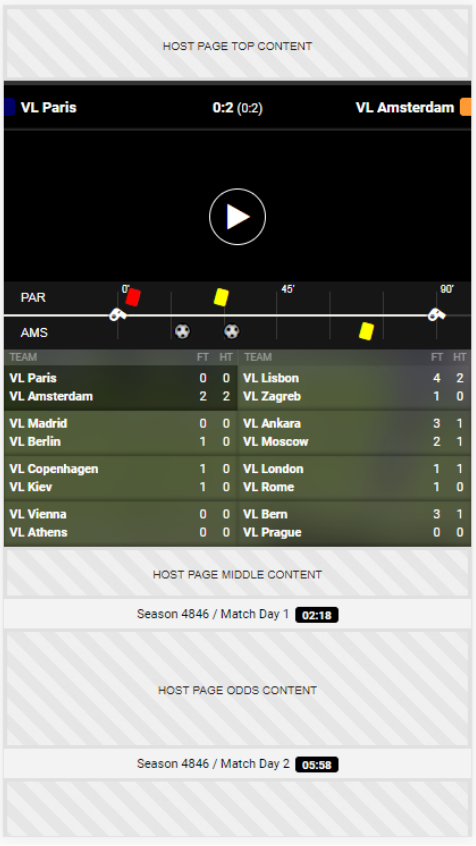
The Sportradar Virtual Sports Mobile Suite video widget is available for a dedicated integration when the bookmaker chooses to do its own odds visualization. This includes the video area with the live scores, time line and possibility to switch between the available matches.
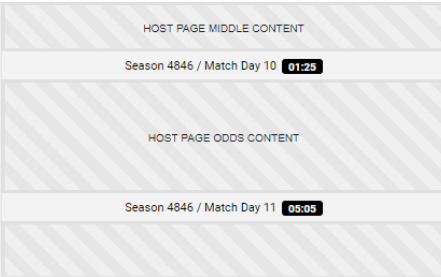
Additionally it includes the separator bars for the odds area, in order to show the information for the upcoming 2 match days.

The video widget is available for Virtual Football, as well as, Virtual Basketball League.
Host page HTML requirements
Sportradar’s Virtual Sports Mobile Video Widget is a framework for a mobile web application, which integrates into an existing mobile-optimized website as a JavaScript plugin.
In order to integrate the video widget plugin, the following steps must be implemented in the host webpage:
Include the vsmobile JavaScript plugin
The JavaScript plugin is hosted on Sportradar's servers. {domain} will be provided by your assigned integration manager during integration.
Configurable parts in the URL are the customer name (<CUSTOMER>), language code (<LANGUAGE_CODE>, e.g. en) and time zone (<TIME_ZONE>, e.g. Europe:Berlin). The time zone parameter is optional. The UI customization is based on the client name URL parameter, therefore each client is assigned a unique client name. Language should follow the localization of the host page.
The following is an example script URL:
Provide container DOM elements in which the UI will be injected
A container element is typically a div tag or some other block element with id attribute set. Example
is shown below:
If you want to use optional features like the match day title components, you need to provide container elements for those as well:
Add meta tags to the <HEAD> section
meta tags to the <HEAD> sectionSportradar’s Virtual Sports Mobile Video Widget is a web page optimized for mobile browsing. For optimal mobile experience the following meta tags should be added to a section in the host HTML page.
The first <meta> tag is needed for setting the viewport to a size of the display on the device and for
disabling zoom. It also instructs the browser to minimize the address bar and toolbars on some
devices.
The second and third lines enable the use of full-screen mode in iOS devices under certain circumstances.
It is also recommended to add <link rel="icon" />, <link rel="apple-touch-icon /> and <link rel="manifest" /> tags to the head of the document in order to customize the application icon if the user adds the page to their home screen.
Plugin initialization
The widget is initialized using the vsmobile.init() method. First parameter is the CSS selector that returns the container element and the second parameter contains initialization options. The parameter sport in the initialization options must be set to vflm.widget-mobile. Sample code of the initialization call is shown below. Note that only one application instance may be initialized on the host page at any given time:
Initialization options
Initialization options are added as a second parameter in the init method. Example of one such
object is shown below. Use this object just as an example that contains all the available parameters
(usually you do not need to use them all).
The initialization options are documented in the table below. Callback functions are described in detail in the following section.
sport
yes
string
null
The sport to display on this page. The only supported options are:
vflm.widget-mobile
vfnc.widget-mobile
vfwc.widget-mobile
vfas.widget-mobile
vfc.widget-mobile
vfcc.widget-mobile
vbl.widget-mobile
onLoad
no
function
/
Callback function which is called when application is loaded.
showUnsupportedDeviceWarning
no
boolean
true
Set to false to disable warning for unsupported devices (this warning is shown once on the first load).
clientId
no
numeric
implicit
The numeric client identifier (Sportradar S4 client ID). Primarily used for internal testing purposes.
setEvents
no
function
/
Callback function which is called every betstop phase. Returns information regarding the current sport (including event_ids).
currentMatchdayTitleContainer
no
string
null
Id of the container element for the current match day title component.
nextMatchdayTitleContainer
no
string
null
Id of the container element for the next match day title component.
Callbacks
With callbacks, you can respond to events in the video widget application. There are several
callbacks that can be implemented on client side. The first parameter to all callbacks is the VSM
instance that triggered the callback.
onLoad
onLoadThis callback function is called when application is loaded. API methods may safely be called only after the application is loaded, as signaled by this callback.
setEvents
setEventsThis callback function is called whenever new events (e.g. matches or races) are available for
betting. It is called during the betstop phase in league mode and in the group stage of the cup mode,
but can vary in the knockout stage of the cup mode. Returns information regarding the current sport.
The data object has the following properties:
screen_name
E.g. mobile-cup (for VFC, VFNC, ...) or mobile-league (for VFLM, ...).
sport
VFC, VFNC, VFLM, VBL
unique_tournament_id
The unique tournament id.
chunks
Array containing chunk objects. This first chunk contains the next events that can be bet on, the second chunk contains the events after that, and so on. Usually 2 entries, but can only 1 during a knockout stage.
A chunk object has the following properties:
competition_nr
Continuous number of the competition which this event belongs to, as displayed on-screen (positive integer).
competition_stage_type
Type of the stage this event belongs to. league (group stage or league mode) or cup (knockout stage).
eventset_nr
Number of the event set (round or match day; between 1 and 30)
event_ids
Array containing the event_ids (matches or races) that occur at the same time (positive integer).
Plugin instance methods
Instance methods provided by the VSM object that is returned at initialization.
Adds a new widget and returns handle id which can be passed to removeVsmWidget to remove the
given widget.
Removes the widget with the passed handle id.
Please not that use of these methods is only recommended with in-depth knowledge of available widget options.
Optional widget components - Match list divider bar widget
The following widgets can be used within Sprotradar’s Virtual Sports Mobile Video Widget. It can show the current or upcoming round with corresponding betstop timer:

It is recommended you don’t add this component manually and just provide the currentMatchdayTitleContainer and/or nextMatchdayTitleContainer options.
Initialization example
Last updated
Was this helpful?