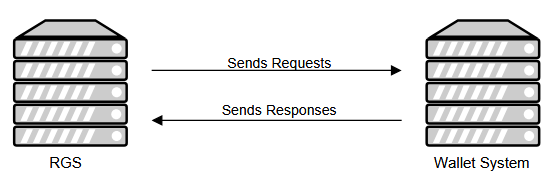
| Parameter | Type | Required | Description |
|---|---|---|---|
balance | number | Required | Funds available in the user’s account. |
correlationNumber | integer | Required | A number used to match associated request and response elements. |
currencyCode | string | Optional | A three-character ISO 4217 code specifying the currency used by the user. |
status | Status | Required | An enumeration member describing potential errors encountered while processing associated request element. See section Status Codes for further details. |
| Status Code | Description |
|---|---|
OK | The associated request element was processed successfully. |
REQUEST_FORMAT | The format of the associated request element was not correct (missing required field…). |
INVALID_TOKEN | The specified user token is not valid or was revoked. |
INSUFFICIENT_FUNDS | The player does not have enough funds to complete the requested action. |
USER_NOT_FOUND | The player specified by the userId does not exist in your wallet system. |
INVALID_CREDENTIALS | The provided credentials are not valid. |
USER_FROZEN | The player specified with the userId is frozen. |
DUPLICATE_PAYMENT_ID | The specified paymentId is already in use. |
PAYMENT_ID_NOT_FOUND | The transaction with the specified paymentId was not found. |
RISK_VALIDATION | The payment request was denied due to failed risk validation. |
CANCEL_NOT_POSSIBLE | The transaction cannot be canceled because it has already been approved. |
USER_EXISTS | The player with the specified identifier already exists. |
ERROR | An unknown error occurred while processing the request element. |
| Parameter | Type | Required | Description |
|---|---|---|---|
correlationNumber | integer | Required | A number used to match request and response elements. |
token | string | Optional | A token passed to the platform when authenticating the user. |
| Parameter | Type | Required | Description |
|---|---|---|---|
balance | number | Required | Player’s funds available on their account. |
correlationNumber | integer | Required | A number used to match associated request and response elements. |
currencyCode | string | Optional | A three-character ISO 4217 code specifying the currency used by the user. Currency codes must be provided in lower case. If no currency is added, it will fall back to default |
languageCode | string | Optional | An ISO 639-1 code specifying the language of the user. Language codes must be provided in lower case. If no language will be added it will fall back to default |
status | Status | Required | An enumeration member describing potential errors encountered while processing an associated request element. See section Status Codes for further details. |
timeToLive | integer | Optional (deprecated) | A value specifying the time interval after which the token will expire. |
userId | string | Required | A pseudo anonymous string uniquely identifying the user in your wallet system.
Values for
· Allowed characters are [0-9A-Za-z_-] · Max. length is 36 |
username | string | Optional | A username of the user in your wallet system. |
vipLevel | string | Optional | A VIP level of the user in your wallet system. |
| Parameter | Type | Required | Description |
|---|---|---|---|
correlationNumber | integer | Required | A number used to match request and response elements. |
token | string | Optional | A token passed to the platform when authenticating the user. |
userId | string | Required | A pseudo anonymous string uniquely identifying the user in your wallet system. Values for
· Allowed characters are [0-9A-Za-z_-] · Max. length is 36 |
| Status Code |
|---|
OK |
REQUEST_FORMAT |
INVALID_TOKEN |
USER_NOT_FOUND |
ERROR |
| Parameter | Type | Required | Description |
|---|---|---|---|
correlationNumber | integer | Required | A number used to match request and response elements. |
currencyCode | string | Optional | A three-character ISO 4217 code specifying the currency used by the user. Currency codes must be provided in lower case. |
gameCategoryCode | string | Optional | A value specifying the category of the game associated with the request. |
gameCode | string | Optional | A value specifying the game associated with the request. See section Product Game Codes for further details. |
gameFormatCode | string | Optional | A value specifying the channel (web, mobile…) used by the user when placing the bet. |
maxPayout | number | Required | A value specifying the maximum payout for the ticket associated with the request. Risk control is handled on during bet acceptance, before any wallet requests are made. Min and max bet amounts and max payouts can be set in back office. This is only some additional info to inform you about the maximum possible winnings for this reservation, should you wish to implement additional risk control. |
paymentId | string | Required | A value used to uniquely identify the transaction. The value must be unique through the application’s lifetime. |
stake | PaymentElement | Required | A value specifying the amount to be reserved (withdrawn) from the user’s account. |
ticketInfo | string | Optional | A JSON representation of the ticket associated with the current element. |
token | string | Optional | A token that was passed to the RGS when the user was registered |
userId | string | Required | A pseudo anonymous string uniquely identifying the user within the wallet system.
Values for userId are restricted to the following:
· Allowed characters are [0-9A-Za-z_-] · Max. length is 36 |
| Product Game Code | Description |
|---|---|
|
Virtual Football Bundesliga
|
|
Virtual Football English League
|
|
Virtual Football Spanish League
|
|
Virtual Football Italian League
|
|
Virtual Football French League
|
|
Virtual Football German League
|
|
Virtual World Match Football 1
|
|
Virtual World Match Football 2
|
|
Virtual World Match Football 3
|
|
Virtual Fast Football 1
|
|
Virtual Fast Football 2
|
|
Virtual Fast Football 3
|
|
Virtual Football League Mode
|
|
Virtual Football World Cup
|
|
Virtual Football Euro Cup
|
|
Virtual Football Asian Cup
|
|
Virtual Football Nations Cup
|
|
Virtual Football Champions Cup
|
|
Virtual Cricket In-Play
|
|
Virtual Baseball In-Play
|
|
Virtual Tennis In-Play
|
|
Virtual Tennis In-Play ATP 1 (1990s)
|
|
Virtual Tennis In-Play ATP 2 (2000s)
|
|
Virtual Tennis In-Play ATP 3 (2010s)
|
|
Virtual Tennis In-Play ATP 4 (2020s)
|
|
Virtual Basketball League
|
|
Virtual Dogs Kiron
|
|
Virtual Horses Kiron
|
| Parameter | Type | Required | Description |
|---|---|---|---|
amount | number | Required | Specifies the value to be withdrawn or deposited to the user’s account. |
timestamp | integer (int64) | Required | Specifies the time of the event in UTC time. |
| Status Code |
|---|
OK |
REQUEST_FORMAT |
INVALID_TOKEN |
INSUFFICIENT_FUNDS |
USER_NOT_FOUND |
USER_FROZEN |
DUPLICATE_PAYMENT_ID |
RISK_VALIDATION |
ERROR |
| Parameter | Type | Required | Description |
|---|---|---|---|
approvePayment | boolean | Required | A value specifying whether the transaction should be approved. If value is false, the transaction will be approved by a separate message |
correlationNumber | integer | Required | A number used to match request and response elements. |
currencyCode | string | Optional | A three-character ISO 4217 code specifying the currency used by the user. Value should be provided in lower case. |
payment | PaymentElement | Required | A value specifying the amount won by the user (see section PaymentElement for further details). |
paymentId | string | Required | A value used to uniquely identify the transaction. Value must be unique through the application’s lifetime. |
ticketInfo | string | Optional | A JSON representation of the ticket associated with current element. |
userId | string | Required | A pseudo anonymous string uniquely identifying the user within the wallet system.
Values for
· Allowed characters are [0-9A-Za-z_-] · Max. length is 36 |
| Status Code |
|---|
OK |
REQUEST_FORMAT |
USER_NOT_FOUND |
DUPLICATE_PAYMENT_ID |
PAYMENT_ID_NOT_FOUND |
ERROR |
| Parameter | Type | Required | Description |
|---|---|---|---|
correlationNumber | integer | Required | A number used to match request and response elements. |
paymentId | string | Required | A value used to uniquely identify the transaction. Value must be unique through the application’s lifetime. |
ticketInfo | string | Optional | A JSON representation of the ticket associated with current element. |
| Status Code |
|---|
OK |
REQUEST_FORMAT |
USER_FROZEN |
PAYMENT_ID_NOT_FOUND |
ERROR |
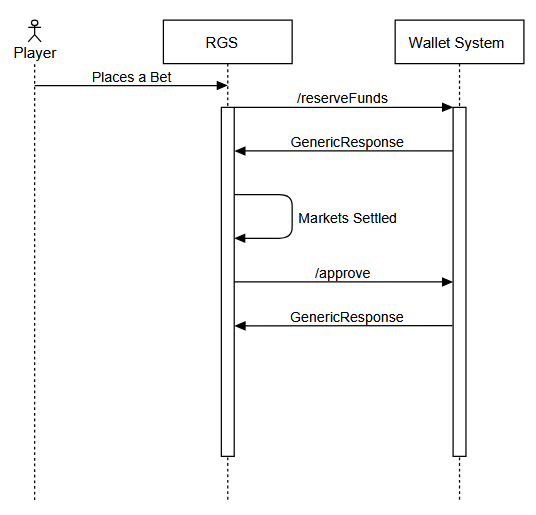
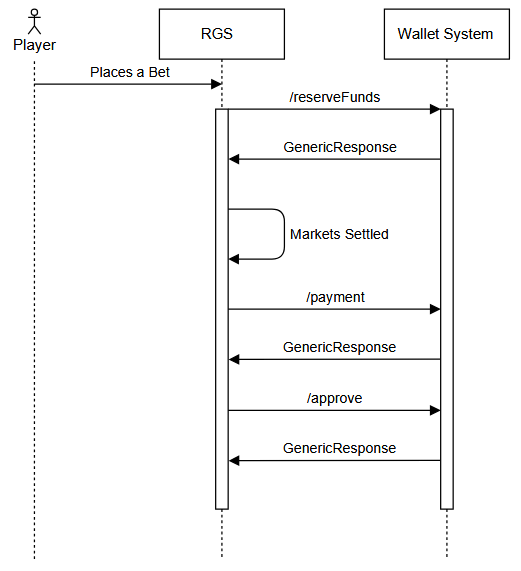
| Parameter | Type | Required | Description |
|---|---|---|---|
correlationNumber | integer | Required | A number used to match request and response elements. |
force | boolean | Optional | A value specified whether to attempt to cancel an approved transaction.
force will be set to true when |
paymentId | string | Required | A value used to uniquely identify the transaction. The value must be unique through the application’s lifetime. |
ticketInfo | string | Optional | A JSON representation of the ticket associated with current element. |
| Status Code |
|---|
OK |
REQUEST_FORMAT |
USER_FROZEN |
PAYMENT_ID_NOT_FOUND |
CANCEL_NOT_POSSIBLE |
ERROR |
| Parameter | Type | Required | Description |
|---|---|---|---|
comment | string | Optional | An optional comment entered by the operator when re-settling a bet. |
correlationNumber | integer | Required | A number used to match request and response elements. |
currencyCode | string | Optional | A three-character ISO 4217 code specifying the currency used by the user. Currency codes must be provided in lower case. |
payment | PaymentElement | Required | A value specifying the amount won by the user (see PaymentElement for further details). |
paymentId | string | Required | A value used to uniquely identify the transaction. Value must be unique through the application’s lifetime. |
userId | string | Required | A pseudo anonymous string uniquely identifying the user within the wallet system.
Values for
· Allowed characters are [0-9A-Za-z_-] · Max. length is 36 |
| Status Codes |
|---|
OK |
REQUEST_FORMAT |
USER_FROZEN |
ERROR |
| Parameter | Type | Description |
|---|---|---|
ticketId | string | The ticket’s unique id. |
status | string | The ticket’s status. See section 3.2.1 for further details. |
bkId | integer | Identifies you as a bookmaker in our system. The bkId will be provided to you by your technical account manager. |
transactionId | string | A value used to uniquely identify the transaction. Value must be unique through the application’s lifetime. |
product | string | A value specifying the game associated with the ticket. |
placedTs | string | 13-digit epoch timestamp representing the time of ticket placement. |
receivedTs | string | 13-digit epoch timestamp specifying the time when the ticket was received by RGS. |
updatedTs | string | 13-digit epoch timestamp specifying the time when the ticket was last updated. |
ticketExpiryTs | string | 13-digit epoch timestamp specifying the time when the ticket is going to expire. |
estimatedSettlementTs | string | 13-digit epoch timestamp specifying the estimated time when the ticket will be settled. |
settledTs | string | 13-digit epoch timestamp representing the time of ticket settlement. |
stake | string | The stake multiplied by 10000. |
possibleWinnings | string | The maximum possible winnings multiplied by 10000. |
totalReturn | string | The actual won amount. |
productType | string | Abbreviation of the product which the ticket was placed under. See section 2.9.1.3 for further details. |
selections | Selection[] | An array containing the selections of a ticket. See section 3.2.2 for further details. |
bets | Bet[] | An array containing all bet combinations of a ticket. See section 3.2.3 for further details. |
exchangeRate | string | Exchange rate between the ticket’s currency and Euro. |
| Status | Description |
|---|---|
UNDEFINED | The ticket has not yet been processed by RGS. |
PLACING | The ticket is currently being processed. |
REJECTED_INTERNAL_ERROR | The ticket was rejected because of an internal RGS error (terminal state). |
REJECTED_EXTERNAL_ERROR | The ticket was rejected because of an external error, e.g., unexpected wallet issues (terminal state). |
REJECTED_BASIC_VALIDATION | The ticket was rejected because basic validation failed, e.g., invalid ticket structure (terminal state). |
REJECTED_SESSION_VALIDATION | The ticket was rejected because it was placed with an invalid authentication token (terminal state). |
REJECTED_RISK_VALIDATION | The ticket was rejected because risk validation failed, e.g., stake too high or too low, possible winnings are too high or too low (terminal state). |
REJECTED_BOOKMAKER_SETTINGS_VALIDATION | The ticket was rejected because bookmaker settings were not respected, e.g., betting restrictions. |
REJECTED_BY_BROKER | The ticket was rejected by the RGS broker. This state is not likely to happen as a more specific rejection status will be associated with the ticket (terminal state). |
REJECTED_WG_INTERNAL_ERROR | The ticket was rejected because of internal RGS wallet adapter error (terminal state). |
REJECTED_WG_EXTERNAL_ERROR | The ticket was rejected because of an external RGS wallet adapter error, e.g., a bookmaker wallet integration issue (terminal state). |
REJECTED_WG_INSUFFICIENT_FUNDS | The ticket was rejected because a punter does not have enough funds available (terminal state). |
REJECTED_WG_SESSION_EXPIRED | The ticket was rejected because the authentication token used with the session expired on bookmaker side (terminal state). |
REJECTED_ADAPTER_INTERNAL_ERROR | The ticket was rejected because of an internal RGS settlement / ticket engine error. The ticket will eventually be cancelled. |
REJECTED_ADAPTER_EXTERNAL_ERROR | The ticket was rejected because of an external RGS settlement / ticket engine error. The ticket will be eventually be cancelled. |
REJECTED_ADAPTER_MARKET_DOES_NOT_EXIST | The ticket was rejected because RGS settlement / ticket engine did not recognize one or more markets. The ticket will eventually be cancelled. |
REJECTED_ADAPTER_NOT_ACKED | The ticket was rejected because RGS settlement / ticket engine did not acknowledge the ticket. This status is not likely to happen as more a specific status will be associated with the ticket. The ticket will eventually be cancelled. |
REJECTED_ADAPTER_MARKET_EXPIRED | Ticket was rejected because the market had expired on RGS settlement / ticket engine. Ticket will eventually be cancelled. |
REJECTED_ADAPTER_TICKET_NOT_VALID | Ticket was rejected because RGS settlement / ticket engine rejected the ticket. Ticket will eventually be cancelled. |
REJECTED_ADAPTER_MARKET_NOT_ACTIVE | Ticket was rejected because market is not active on RGS settlement / ticket engine. Ticket will eventually be cancelled. |
CANCELLATION_PENDING | The ticket is waiting to be cancelled. |
TIMEOUTED | Ticket placement exceeded the timeout threshold. A cancellation attempt will be made. |
PLACED | The ticket was successfully placed. |
CLEARED | The ticket result is known. |
CANCELED_WG | The payment associated with the ticket was cancelled on bookmaker’s wallet. The ticket will be eventually cancelled. |
BACK_OFFICE_SETTLEMENT | The ticket requires manual intervention. |
CANCELED | The ticket was cancelled. |
SETTLED | The ticket was settled and monetized (final state; can be refunded and manually settled afterwards). |
| The ticket was manually settled by a back-office user (final state; can be refunded and manually settled afterwards). |
| The ticket was refunded by a back-office user (final state; can be refunded and manually settled afterwards). |
| The payment associated with the ticket was refunded on bookmaker wallet, but the ticket has not been refunded on RGS settlement / ticket engine yet. |
EXPIRED | The ticket’s result was not recorded and requires manual intervention. |
| Parameter | Type | Description |
|---|---|---|
eventId | string | Betradar’s internal match identifier. |
id | string | Betradar’s internal market type identifier. |
result | string | Represents the result of a selection. Possible values are “+” (won), “-“ (lost), “#” (void) and “*” (open) |
odds | integer | Odds of the selection multiplied by 10000. |
metaData | MetaData | Additional information for the selection. MetaData is not unified and my vary from product to product. See section 3.2.2.1 for further details. |
| Parameter | Type | Description |
|---|---|---|
lang | string | The language code. |
marketName | string | The human-readable market name. |
outcomeName | string | The human-readable name of the selected outcome. |
productType | string | A value specifying the game associated with the ticket. See section 2.9.1.3 for further details. |
tournament | Tournament | Provides details about the tournament. See section 3.2.2.2 for further details. |
| Parameter | Type | Description |
|---|---|---|
name | string | The tournament’s name. |
sequence | string | Additional information about the tournament. Varies from product to product. |
event | Event | Provides details about the event. See section 3.2.2.3 for further details. |
| Parameter | Type | Description |
|---|---|---|
competitors | Competitors[] | Provides information about the competitors of a fixture. See section 3.2.2.4 for further details. |
eventStart | string | 13-digit epoch timestamp representing the time a match started. |
name | string | A name specifying the round within a season. |
sequence | string | Additional information about the event. Varies from product to product. |
| Parameter | Type | Description |
|---|---|---|
id | string | Betradar’s internal competitor identifier. |
name | string | The competitor’s name. |
abbr | string | The abbreviation of the competitor’s name. |
| Parameter | Type | Description |
|---|---|---|
selectionRefs | integer[] | References the selections a bet is built of. |
selectedSystems | integer[] | We identify systems using an array of the length of combinations to include in each bet:
· Singles: [1] - All combinations with length = 1. · Multi: [n] - The only combination where length = n. · System x/n: [x] - All combinations with length 2..n-1, i.e., for a ticket with 4 lines we have 2/4 and 3/4. Each refers to all combinations of x length, respectively [2] and [3]. · Full Cover: [2..n] - All the above excluding singles, i.e., a full cover of 4 lines is identified by [2, 3, 4]. · Full Cover with Singles: [1..n] - All possible combinations including singles: [1, 2, 3, 4]. |
sumOfWins | string | The sum of winnings from won combinations. |