> For the complete documentation index, see [llms.txt](https://docs.sportradar.com/llms.txt). Markdown versions of documentation pages are available by appending `.md` to page URLs; this page is available as [Markdown](https://docs.sportradar.com/mts/features/feature-updates.md).
# Feature Updates
Welcome to the feature updates page for Sportradar's Managed Trading Services. Here you will find the most recent significant updates to our service.
MTS update October 2026 - Bet Builder enhancements / access expansion
#### Bet Builder enhancements / access expansion
We are simplifying our Bet Builder offering and expanding access to sports and features for MTS clients. Our expanded APIs now support the full bet lifecycle—from discovering pre-built combinations and building bets to recalculating odds after a void and enabling cash-out.
Previously, Bet Builder required a separate package for each sport. We have now introduced two consolidated packages: Bet Builder Pre-match and Bet Builder Live, covering the available sports in each offering.
As part of this rollout, MTS clients actively using Bet Builder for at least one sport will automatically receive access to all supported sports outside the premium sports packages, with pre-match and live coverage where supported:
* **Soccer**
* **Basketball**
* **American Football**
* **Baseball**
* **Ice Hockey**
* **Tennis**
* **Volleyball**
* **Rugby Union**
Cricket, Golf and Combat Sports require the relevant premium content package to access the Bet Builder offering.
You will also gain access to the following features:
* **Void Recalculate endpoint**: Recalculate the combined price for the remaining selections when a selection is voided.
* **Cash-out endpoint**: Retrieve fair probabilities to support your Bet Builder cash-out offering.
* **Pre-built endpoint**: Access ready-made Bet Builder combinations to help players discover bets and engage with your offering.
* **Pre-built Studio in Portal**: Configure and manage your pre-built offering through the newly released interface. *Currently available to selected clients, with access rolling out to all clients over the coming weeks. If you would like early access, please get in touch. The Studio currently supports soccer pre-match, with more sports being added each month.*
The previous Basic, Pro and Premium API tiers (100, 250 and 500 requests per second respectively) will be replaced by a single API access tier with no requests-per-second (RPS) limit.
What do you need to do? Access will be activated centrally, without the need to request each sport separately. No separate integration is required for the additional sports, simply ensure your client-side Bet Builder logic calls the existing APIs for these sports.
To start using the new features, review the documentation below and use the portal to integrate the relevant endpoints into your betting flows:
* [Void Recalculate](https://docs.sportradar.com/uof/custombet-cb/api/void-recalculation)
* [Pre-built endpoint](https://docs.sportradar.com/uof/custombet-cb/api/pre-built-bet-recommendation)
* [Pre-built Studio](https://portal.betradar.com/custombets-demo)
ITS Console features update July 2026 - Market-level LTD offsets
#### Market-level Live Time Delay (LTD) offsets
MTS and ITS traders can now configure **market-level Live Time Delay (LTD) offsets** to fine-tune the delay applied to individual markets. This provides more granular control than event-level LTD alone and helps manage risk based on the characteristics of specific markets.
This feature is available exclusively for clients migrated to the new system (v3.0).
**To configure market-level LTDs:**
**LTD offset column:** A new column displays a dropdown for each market row, allowing selection of offsets between -5 s and 15 s (default: 0 s).
**Override alerts (orange icon):** A details icon is displayed next to each dropdown. If a market has overridden values, this icon is highlighted in orange to immediately signal to traders that global settings are not inherited. Otherwise, the icon remains grey.
The configured market-level offset is added to the applicable Live Time Delay during ticket validation. If no market-specific configuration exists, a default offset of 0 seconds is used. All changes are fully audited and available in the History section.
**Fieldbook monitoring:** Traders can monitor active time delays and offsets in real-time within the Fieldbook market widgets:
* **Widget display:** Displays the resolved live time delay and offset as: LTD: \[Resolved LTD] s (LTD Offset: \[Market Offset] s).
* **Live calculation:** Calculates the displayed LTD dynamically based on the active Event LTD and the resolved market-level offset (capped at 15 s).
* **Explanation tooltip:** Hovering over the info icon displays: Market LTD = Event LTD + Market LTD Offset.
ITS Console features update March 2026 - Monitoring page
#### Monitoring page
The Load More Tickets functionality has been enabled on **Bet Ticker**. Additionally, we have added color-coding for tickets based on their settlement status.
* WIN: Light red
* LOSS: Light green
* VOID/PUSH: Light yellow
* CASHOUT: Light blue
* CANCELLED: **Dark grey** (unchanged)
* REJECTED: Light grey (unchanged)
ITS Console features update January 2026 - Market-level rating overrides
#### Market-level rating overrides
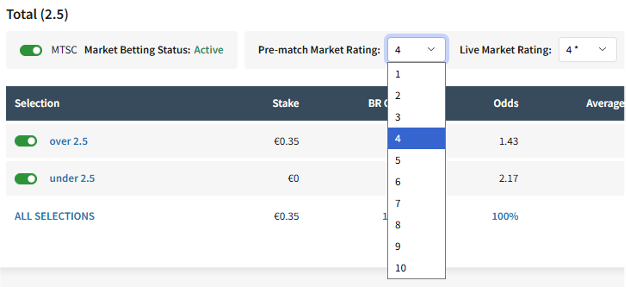
We are adding a new level of granularity to rating updates. In addition to tournament- and event-level ratings, market-level ratings will allow traders to manage their exposure to liability more precisely. This enhancement allows for more precise control of liability limits based on the characteristics and risk profile of each market.\
This feature is exclusively available to clients who have migrated to the **new gates** (v3.0).
#### Fieldbook UI updates
Two new dropdowns have been introduced in the Markets section of Fieldbook:
* Pre-Match Market Rating
* Live Market Rating
These ratings work similarly to the existing tournament and event-level rating fields. Users can now assign a market rating on a scale of 1–10. Each market will inherit its rating from the corresponding event level by default. In cases where the rating is inherited, an asterisk (\*) will be displayed.\
The liability limits and the percentage of liability reached will automatically recalculate based on the assigned market rating.
#### Save modal
Clicking a rating in the dropdown opens the **Save** modal. The modal will open automatically in either **Global** or **Bookmaker** mode, depending on the level currently selected in the Fieldbook.
In the ITS Console, Global represents the collective rating across all bookmakers within the profile. If all bookmakers in a profile share the same pre-match or live rating, that value will be displayed as the Global rating. If the ratings differ by bookmaker, no single Global value can be shown.
#### Market variants
We have also introduced the ability to batch update markets with multiple variants. Please note that this feature will be available in the next release.
For example, there are markets of the same type that differ in the line. These include Handicap (-0.5), Handicap (-0.75), and Handicap (-1.0), among others.
ITS Console features update November 2025 - Monitoring, Customers page
#### The Monitoring
The “Producers” filter now includes new options for 3rd-party feeds.
This enhancement supports transactions 3.0 only.
When no producer is selected, the system will display all tickets.
#### Customers Page
An additional filter was added on the Customers Bet History page to improve the efficiency of locating specific tickets.
The filter provides three selectable options and operates seamlessly alongside all other existing filters:
* **Settled** – Shows all tickets with a final settlement state, including Win, Loss, Void, Cancelled, or Cashout.
* **Unsettled** – Shows all tickets that have not yet reached any settlement status.
* **Cashout** – Shows only tickets that have been cashed out.
ITS Console features update November 2025 - Customer batch modify
#### Customer batch modify
ITS clients can now use the **Customer batch modify** feature.
To use it, simply navigate to the **Customers** page and click the **Batch modify** button.
ITS users can update the **CCF**, **LTD**, and **Notes** fields simultaneously for one or multiple customers. After entering the Customer IDs, you will be able to retrieve and view their current values in **MTS**.
**Please note:** The unique **Customer ID** can be obtained from the **Report Generator** page, either directly from the generated report or from the exported **CSV** file.
***
{% file src="/files/8sa02GflUN60pKFSWuJU" %}
---
# Agent Instructions
This documentation is published with GitBook. GitBook is the documentation platform designed so that both humans and AI agents can read, navigate, and reason over technical content effectively. Learn more at gitbook.com.
## Querying This Documentation
If you need additional information that is not directly available in this page, you can query the documentation by asking a question.
Perform an HTTP GET request on the following URL with the `ask` and `goal` query parameters:
```
GET https://docs.sportradar.com/mts/features/feature-updates.md?ask=&goal=
```
`ask` is the immediate question: it should be specific, self-contained, and written in natural language.
`goal` is what the user is ultimately trying to achieve, the reason they need the answer. Sharing it helps GitBook give you a better, more relevant answer. A goal is most helpful when it describes the outcome the user wants rather than restating the question. For example, with `ask=how do I create an API token`, a goal like `automate deployments from our CI pipeline` lets GitBook tailor the answer to that use case.
The response will contain a direct answer to the question and relevant excerpts and sources from the documentation.
Use this mechanism when the answer is not explicitly present in the current page, you need clarification or additional context, or you want to retrieve related documentation sections.



.png?alt=media&token=c901349a-56f5-40fb-8e20-aa93fd500e4e)


