# Virtual Dogs Kiron

## UI - Visualization component <a href="#toc530493726" id="toc530493726"></a>

The Virtual Dogs Kiron visualization component is delivered as an `iframe` with a responsive interface.

Below URL provides an example as shown on [Sportradar’s Virtual Sports Demonstrator](https://virtualsports.sportradar.com/product/vhk):

```
https://{domain}/vdk/vdk/index?clientid={clientid}&lang={lang}&style={style}&oddType={oddType}
```

<table><thead><tr><th valign="top">Parameter</th><th valign="top">Required</th><th valign="top">Description</th></tr></thead><tbody><tr><td valign="top"><code>clientid</code></td><td valign="top">required</td><td valign="top">Identifies you as a bookmaker in our system. The id will be provided to you by your technical account manager.</td></tr><tr><td valign="top"><code>lang</code></td><td valign="top">optional</td><td valign="top"><p>Specifies the display language in the visualization component(ISO 639-1 specification).</p><p>Most European language are already available and other can be added on demand</p></td></tr><tr><td valign="top"><code>style</code></td><td valign="top">optional</td><td valign="top">If needed, your technical account manager will provide you with a style parameter. If not provided, the default style will be applied and there is no further action needed from your side.</td></tr><tr><td valign="top"><code>oddType</code></td><td valign="top">optional</td><td valign="top">Specifies the odds display format. The parameter does not have impact on how odds are calculated and only triggers a simple conversion from decimal odds to the specified odds format. If this is not specified, the default odds format will be decimal.</td></tr></tbody></table>

Multi language support is available by optional `language` parameter in URL. Most common languages are already supported, others on demand.

## Cross-origin communication between UI and parent `iframe`

We need to enable communication between the UI and market offer (e.g. switch the odds section to selected match day by mouse click at a match day button within the match day selector component).&#x20;

### Listening to `postMessages` <a href="#toc530493731" id="toc530493731"></a>

For Virtual Dogs Kiron, you have to setup an event listener for `postMessages`:

```javascript
window.addEventListener("message", receiveMessage);
```

* `messageType` can be of the following:
  * `setHeight`
  * `svg:response`
  * `switchEvents`
* `messageData.type` could be `competitor` (for jersey), `form`, `rating` or `lengthbehindwinner`
* `messageData` should contain always `race` (e.g: `vdr:stage:3717087`), `competitor` (e.g.: `sr:competitor:456545`) and sport `vhk`

```html
<script type="text/javascript">
    function receiveMessage(event) {
        var data = event.data;
        // assumption: if event.data is an string, it was JSON.stringifed before.
        if (typeof data === "string") {
            data = JSON.parse(data);
        }

        var type = data.messageType;
        var data = data.messageData;

        // switch case
        // console.log("customer received", type, data);
        switch (type) {
            case 'setHeight':
                document.getElementById('iframe').style.height = data.height + "px";
                break;
            case 'svg:response':
                // do something with the data from response
                var imageDiv = document.getElementById('images');
                var newDiv = document.createElement('div');
                newDiv.innerHTML = data.svg;
                imageDiv.appendChild(newDiv);
                break;
            case 'switchEvents':
                // do something with the data from response
                document.getElementById('switchEvents').innerHTML = JSON.stringify(data);
                break;
            default:
                //console.log('default');
                break;
        }

    }
</script>
```

#### `switchEvents`

This `postMessage` is called once after loading the page, each time a user clicks a race in the ‘Race Calendar’,  as well as, when a race starts.&#x20;

This function can be used to bring the race related odds to the users focus by scrolling the odds list to this position: &#x20;

```json
{
    "messageType": "switchEvents",
    "messageData": {
        "event_start": 1567697231,
        "unified_event_ids": [
            "vdr:stage:15498902"
        ],
        "sport": "vdk",
        "application": "desktop",
        "unique_tournament_id": 936970
    }
}
```

### Sending `postMessages`

You can send `postMessages` to the `iframe` in order to `retrieve` a competitor's jockey jerseys, rating or form.

Messages to the `iframe` must be of `messageType` `svg:request`. Examples of such messages can be seen below.&#x20;

#### **Getting bib images**

You can download bib images as Scalable Vector Graphic in order to embed it into your market offer:

<figure><img src="/files/MNZCAiQDSzq2aEL2A7MQ" alt=""><figcaption></figcaption></figure>

You can do so by sending the following request via `postMessage` to the `iframe`.

```javascript
iframe.postMessage(JSON.stringify({ 
    messageType: 'svg:request', 
    messageData: { 
        type: 'competitor', 
        race: 'vdr:stage:15498902', 
        competitor: 'sr:competitor:455655', 
        sport: 'vdk' 
    } 
}), '*')
```

#### Getting form

You can download the competitor's form as Scalable Vector Graphic in order to embed it into your market offer:

<figure><img src="/files/GPKjRB2A7oDJ1UZFrBWH" alt=""><figcaption></figcaption></figure>

You can do so by sending the following request via `postMessage` to the `iframe`.&#x20;

```javascript
iframe.postMessage(JSON.stringify({ 
    messageType: 'svg:request', 
    messageData: { 
        type: 'form', 
        race: 'vdr:stage:15498902', 
        competitor: 'sr:competitor:455655', 
        sport: 'vdk' 
    } 
}), '*')
```

#### Getting rating

You can download the competitor's rating as Scalable Vector Graphic in order to embed it into your market offer:

<figure><img src="/files/bcqlfbsHf9Dc9Lc1jVqM" alt=""><figcaption></figcaption></figure>

You can do so by sending the following request via `postMessage` to the `iframe`. &#x20;

```javascript
iframe.postMessage(JSON.stringify({ 
    messageType: 'svg:request', 
    messageData: { 
        type: 'rating', 
        race: 'vdr:stage:15498902', 
        competitor: 'sr:competitor:455655', 
        sport: 'vdk' 
    } 
}), '*')
```

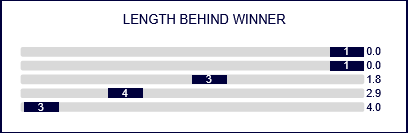
#### Getting length behind winner

You can download a competitor's length behind winner as Scalable Vector Graphic in order to embed it into your market offer:

<figure><img src="/files/WxvU6BJCK2xvkADqQePs" alt=""><figcaption></figcaption></figure>

&#x20;You can do so by sending the following request via `postMessage` to the `iframe`. &#x20;

```javascript
iframe.postMessage(JSON.stringify({
    messageType: 'svg:request',
    messageData: { 
        type: 'lengthbehindwinner', 
        race: 'vdr:stage:15498902', 
        competitor: 'sr:competitor:455655', 
        sport: 'vdk' 
    }
}), '*')
```


---

# Agent Instructions: Querying This Documentation

If you need additional information that is not directly available in this page, you can query the documentation dynamically by asking a question.

Perform an HTTP GET request on the current page URL with the `ask` query parameter:

```
GET https://docs.sportradar.com/games/virtual-sports/virtual-sports-via-unified-odds-feed-uof/frontend-integration/desktop-integration/virtual-dogs-kiron.md?ask=<question>
```

The question should be specific, self-contained, and written in natural language.
The response will contain a direct answer to the question and relevant excerpts and sources from the documentation.

Use this mechanism when the answer is not explicitly present in the current page, you need clarification or additional context, or you want to retrieve related documentation sections.