> For the complete documentation index, see [llms.txt](https://docs.sportradar.com/llms.txt). Markdown versions of documentation pages are available by appending `.md` to page URLs; this page is available as [Markdown](https://docs.sportradar.com/games/virtual-sports/virtual-sports-via-unified-odds-feed-uof/frontend-integration/desktop-integration/general-information.md).
# General Information
## Customer contact configuration
In case of maintenance (72 hours prior to the start) or urgent messages, the Sportradar support team is sending out notification emails to all customers.
To receive such notifications, follow the instructions described in section [Important Notifications](/uof/introduction/integration-process/important-notifications.md) and make sure to subscribe to the Virtual Sports services that you are interested in.
## Odds implementation
Additionally, to the integration of the visual component of Virtual Sports, bookmakers need to integrate Virtual Sports fixtures, markets and odds suggestions using [Sportradar’s Unified Odds Feed](https://docs.sportradar.com/uof/) in order to take bets.
Sportradar’s Unified Odds Feed continuously provides update for Virtual Sports matches. Thus, it is mandatory to have a permanent and stable connection. Refer to the respective specification for detailed information on how to handle alive message delays or missing alive messages, how to handle connection problems and disconnects, as well as, how and why to synchronize after a reconnect.
## Promotion packages
For promotion purposes there are promotion assets available for Sportradar's Virtual Sport. Please contact your account manager in case you want to get access to these assets.
## Reporting
Virtual Sports customers are obliged to provide instant access to an online reporting tool where current and past figures are obtainable for Sportradar's product in invoicing teams.
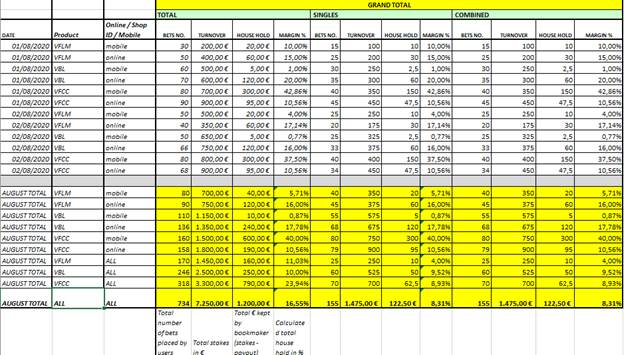
Sportradar reports are created on demand as well as on a monthly basis (invoicing purpose). For this purpose, figures need to fulfill the format requirements listed below:
* There should be a clear distinction between bets placed through the 3 different available Sportradar Virtual Sports platforms: Online / Shop / Mobile.
* Total bets, single bets and combined bets placed need to be listed separately.
* Figures need to be listed for each day of the month in a consecutive list as well as in a cumulative column for the entire period.
* All figures need to be exportable to an Excel file, with the format as proposed (as seen in the screen shot) in the example file mentioned below.
---
# Agent Instructions
This documentation is published with GitBook. GitBook is the documentation platform designed so that both humans and AI agents can read, navigate, and reason over technical content effectively. Learn more at gitbook.com.
## Querying This Documentation
If you need additional information that is not directly available in this page, you can query the documentation dynamically by asking a question.
Perform an HTTP GET request on the current page URL with the `ask` query parameter, and the optional `goal` query parameter:
```
GET https://docs.sportradar.com/games/virtual-sports/virtual-sports-via-unified-odds-feed-uof/frontend-integration/desktop-integration/general-information.md?ask=&goal=
```
`ask` is the immediate question: it should be specific, self-contained, and written in natural language.
`goal` is optional and describes the broader end goal you are ultimately trying to accomplish on behalf of the user. GitBook uses it to tailor the answer towards what is most useful for that goal.
The response will contain a direct answer to the question and relevant excerpts and sources from the documentation.
Use this mechanism when the answer is not explicitly present in the current page, you need clarification or additional context, or you want to retrieve related documentation sections.