> For the complete documentation index, see [llms.txt](https://docs.sportradar.com/llms.txt). Markdown versions of documentation pages are available by appending `.md` to page URLs; this page is available as [Markdown](https://docs.sportradar.com/ctrl/guide/configuration/feed-options-pre-match.md).
# Feed Options Pre-match
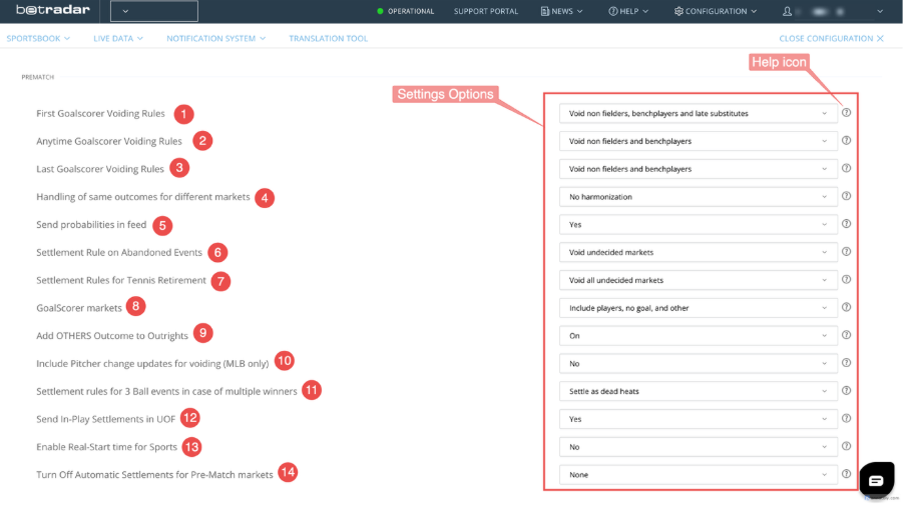
In this section, you can find several options for the data sent through the feed. An explanation of each option can be found by clicking on the ‘**?**’ icon.
**In more detail:**
**Goalscorer Voiding Rules:** In the first three options, the user can set the refund options for the three main Goalscorer markets. (First Goalscorer, Anytime Goalscorer, and Last Goalscorer).
These options are:
* No void
* Void non fielders. (Non fielders: Players who were not listed in the match day squad)
* Void non fielders and bench-players. (Bench players: Players who were listed in the squad but remained on the substitute bench and did not play in the game)
* Void non fielders, bench-players and late substitutes (for the First Goalscorer). (Late Substitutes in: Players who came into the game, after the first goal was scored)
* Void non fielders, bench-players and early substitutes out (for the Last Goalscorer). (Early Substitutes out: Players who came out of the game before the last goal was scored)
**Handling of the same outcomes for different markets:** This option enables the harmonisation of the odds for outcomes of different markets that correspond to the same event. There are three options that will harmonise the odds to the minimum, the average, or the highest value, and an option to have the harmonisation feature turned off.
Please note that harmonisation will overwrite the set key of a market, and especially in the case of “Use maximum value” could potentially cause surebet situations.
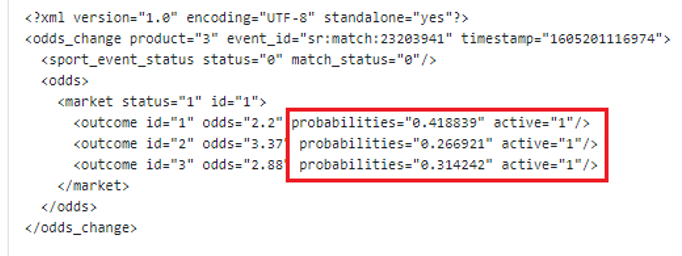
**Send probabilities in the feed:** the user can choose whether to see the probability of each outcome. Example:
**Settlement Rule on Abandoned Events:** Here, the user can set refund rules for events that got cancelled or abandoned. The option “Void undecided markets” will settle the markets that can be settled based on the time the match was abandoned. For example, if a soccer match was abandoned on the 75th minute, the 1st Half markets will still receive settlements when this option is enabled.
**Settlement Rule for Tennis Retirement:** Like the above, but for Tennis Retirements.
The second option will settle the winner, the currently played set, and the game if the 1st point is scored, in favor of the player that is progressing.
{% hint style="info" %}
For this option to be applied, the above option regarding abandoned events must be set to “Void undecided markets”.
{% endhint %}
**What lottery types should WNS offer:** Here the user can select which types of lotteries they wish to offer via the WNS Producer. (Please note that this option is available only for users who have the WNS package.
**GoalScorer markets:** This option allows users to add extra outcomes to Goalscorer markets, such as “no goal”, “own goal”, and “other”.
Please ensure you have the correct integration to consume these additional options. You can read the latest Unified Feed documentation to learn how to enable this feature or contact our support team.
{% hint style="info" %}
Changing this setting will create new versions of the markets, with new IDs. Previous versions will be closed and no longer visible in Ctrl. The “old” versions will still receive the appropriate Settlements.
{% endhint %}
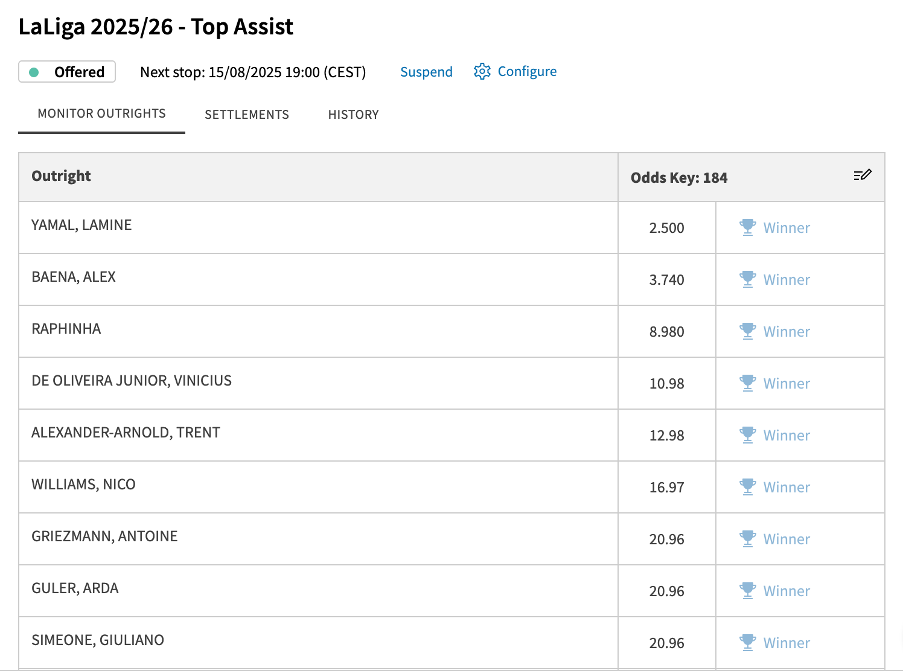
Add OTHERS Outcome to Outrights: With this option, the user can add the outcome “OTHERS” to the Outrights. Please note that the “OTHERS” outcome will appear as a placeholder in most cases, and the odds will not adjust based on the set key. Example:
Please ensure the correct integration is enabled to enable this feature.
**Include Pitcher change updates for voiding (MLB only):** this option takes effect only in USA’s Major League Baseball, and by setting the option to “Yes”, the user will receive a Bet Cancel message in the feed, for the appropriate time frames, when there are pitcher changes.
**Settlement rules for 3 Ball events in case of multiple winners:** With this option, the user can select how the golf 3 Ball events will be settled, in case of multiple first-place winners.
---
# Agent Instructions
This documentation is published with GitBook. GitBook is the documentation platform designed so that both humans and AI agents can read, navigate, and reason over technical content effectively. Learn more at gitbook.com.
## Querying This Documentation
If you need additional information that is not directly available in this page, you can query the documentation dynamically by asking a question.
Perform an HTTP GET request on the current page URL with the `ask` query parameter, and the optional `goal` query parameter:
```
GET https://docs.sportradar.com/ctrl/guide/configuration/feed-options-pre-match.md?ask=&goal=
```
`ask` is the immediate question: it should be specific, self-contained, and written in natural language.
`goal` is optional and describes the broader end goal you are ultimately trying to accomplish on behalf of the user. GitBook uses it to tailor the answer towards what is most useful for that goal.
The response will contain a direct answer to the question and relevant excerpts and sources from the documentation.
Use this mechanism when the answer is not explicitly present in the current page, you need clarification or additional context, or you want to retrieve related documentation sections.