> For the complete documentation index, see [llms.txt](https://docs.sportradar.com/llms.txt). Markdown versions of documentation pages are available by appending `.md` to page URLs; this page is available as [Markdown](https://docs.sportradar.com/bettor-sense/bettor-sense-user-interface/accounts.md).
# Accounts
The Accounts page provides an overview of the player base and a list of the bookmaker's customers with sorting, filtering, and search functionalities. It's divided into two parts:
* Bookmaker insights
* Accounts listing
All data is grouped into timeframes based on UTC (not localized).
***
### Bookmaker insights
#### Executive summary
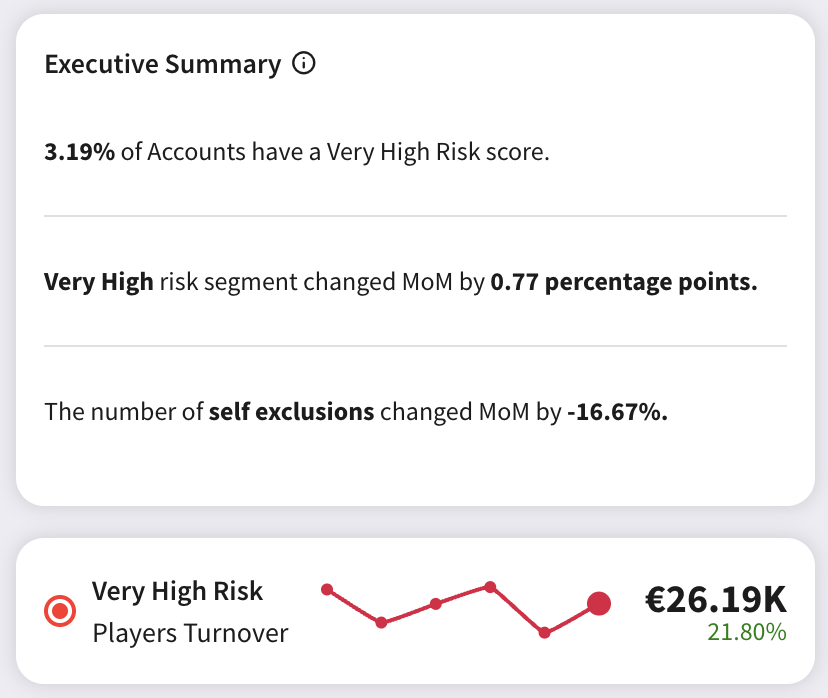
The Executive Summary provides an overview of problematic accounts with a "Very High" risk score, changes in self-excluded players, and turnover from very high-risk players over the past six months.
#### Accounts by Risk score
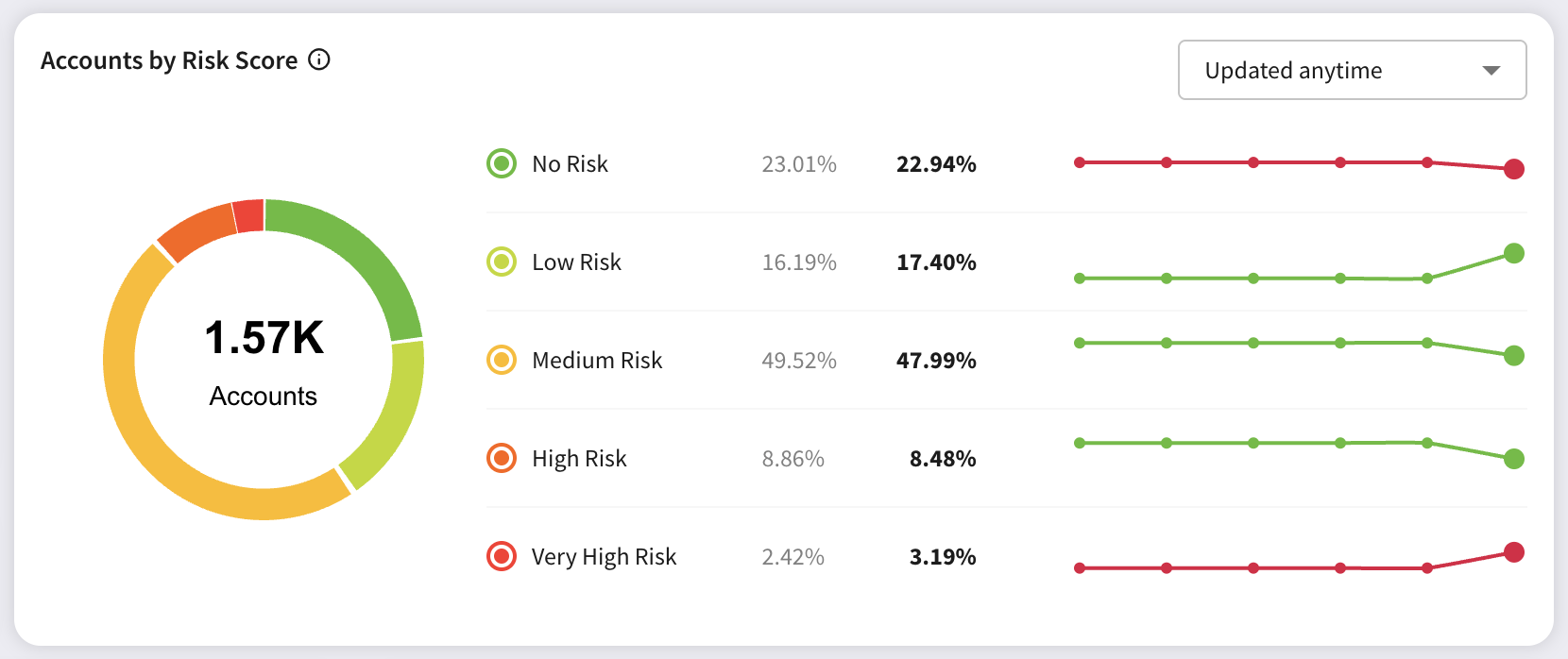
* Displays the distribution of players across five risk categories and compares it to one month ago.
* Shows the trend line for each risk category, indicating how the distribution of players looked over the past 6 months.
* You can switch from "Updated anytime" to show only players with risk scores updated in the past 30 or 7 days to focus on active players.
Based on the Risk score, each player is assigned a Risk category using the following ranges:
| Category name | Risk score value range |
| -------------- | ---------------------- |
| No risk | < 50 |
| Low risk | \[50, 68) |
| Medium risk | \[68, 95) |
| High risk | \[95, 99) |
| Very high risk | \[99, 100) |
#### RG tool activity\*
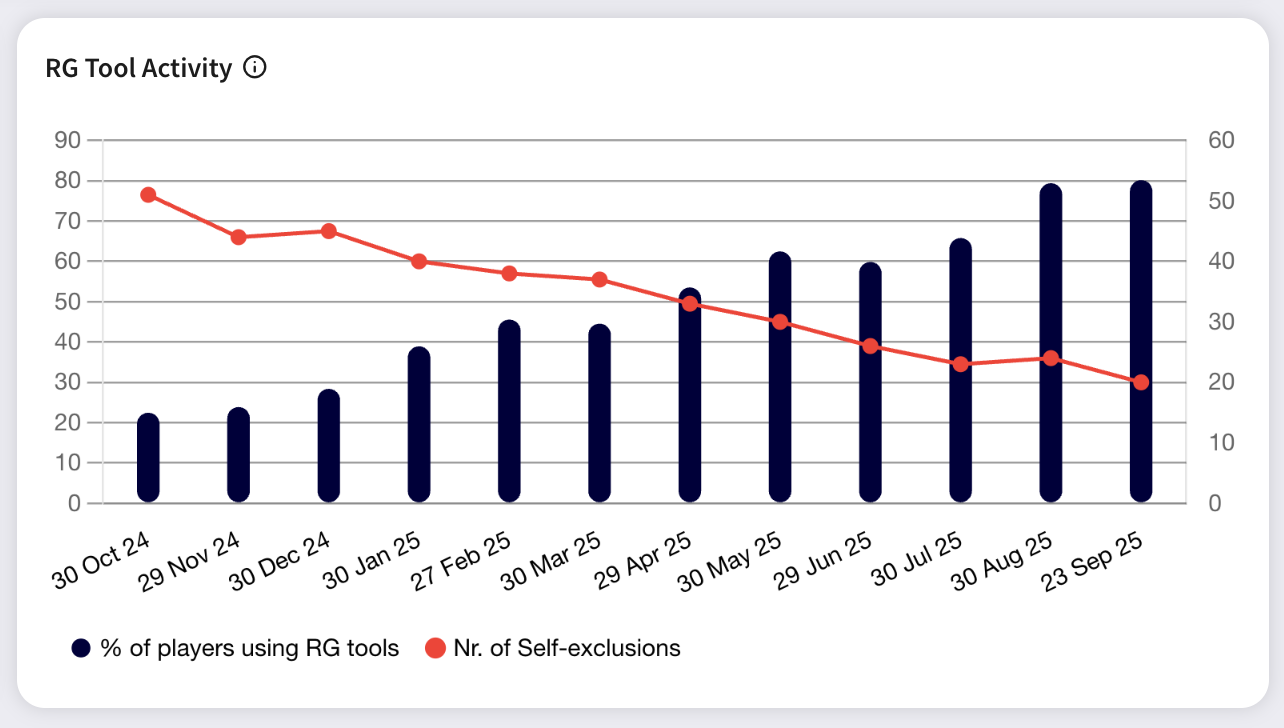
* Shows the percentage of players using RG tools and the number of self-excluded players for each completed month.
* The "% of players using RG tools" is calculated by examining all players who placed at least one bet in the month and determining the share of those who interacted with RG tools at least once during that month.
* The availability of RG tools depends on the data provided by the operator.
{% hint style="info" %}
*Available only for Bettor Sense Premium.*
{% endhint %}
***
### Accounts listing
Displays a list of all players with metadata and RG metrics with these capabilities:
The listing also shows the current **Player Status** and its timestamp so RG teams can quickly see review state across the player base.
* Scrollable list of players.
* Search by player ID — shows only exact matches.
* View player details by clicking on their ID.
* Sort and filter players. The advanced filter can be accessed by clicking the icon to the right of the table.
* The risk escalation filter shows players in the High or Very High risk category who had a risk score increase greater than 20 points in the past 7 days.
* Clear applied filters.
* Export the current list with applied filters as a JSON or CSV file (limited to 1,000 records) for sharing or offline analysis.
---
# Agent Instructions
This documentation is published with GitBook. GitBook is the documentation platform designed so that both humans and AI agents can read, navigate, and reason over technical content effectively. Learn more at gitbook.com.
## Querying This Documentation
If you need additional information that is not directly available in this page, you can query the documentation by asking a question.
Perform an HTTP GET request on the following URL with the `ask` and `goal` query parameters:
```
GET https://docs.sportradar.com/bettor-sense/bettor-sense-user-interface/accounts.md?ask=&goal=
```
`ask` is the immediate question: it should be specific, self-contained, and written in natural language.
`goal` is what the user is ultimately trying to achieve, the reason they need the answer. Sharing it helps GitBook give you a better, more relevant answer. A goal is most helpful when it describes the outcome the user wants rather than restating the question. For example, with `ask=how do I create an API token`, a goal like `automate deployments from our CI pipeline` lets GitBook tailor the answer to that use case.
The response will contain a direct answer to the question and relevant excerpts and sources from the documentation.
Use this mechanism when the answer is not explicitly present in the current page, you need clarification or additional context, or you want to retrieve related documentation sections.