> For the complete documentation index, see [llms.txt](https://docs.sportradar.com/llms.txt). Markdown versions of documentation pages are available by appending `.md` to page URLs; this page is available as [Markdown](https://docs.sportradar.com/bettor-sense/bettor-sense-user-interface/account-details.md).
# Account Details
The "Account details" page gives a detailed overview of each player (customer) that can be accessed by clicking on the player listing of the "Accounts" page.
It is divided into the following parts:
* Basic Info
* Risk Score
* Risk Score Explanation
* Player Insights
* Risk Score Through Time
* Activity Log
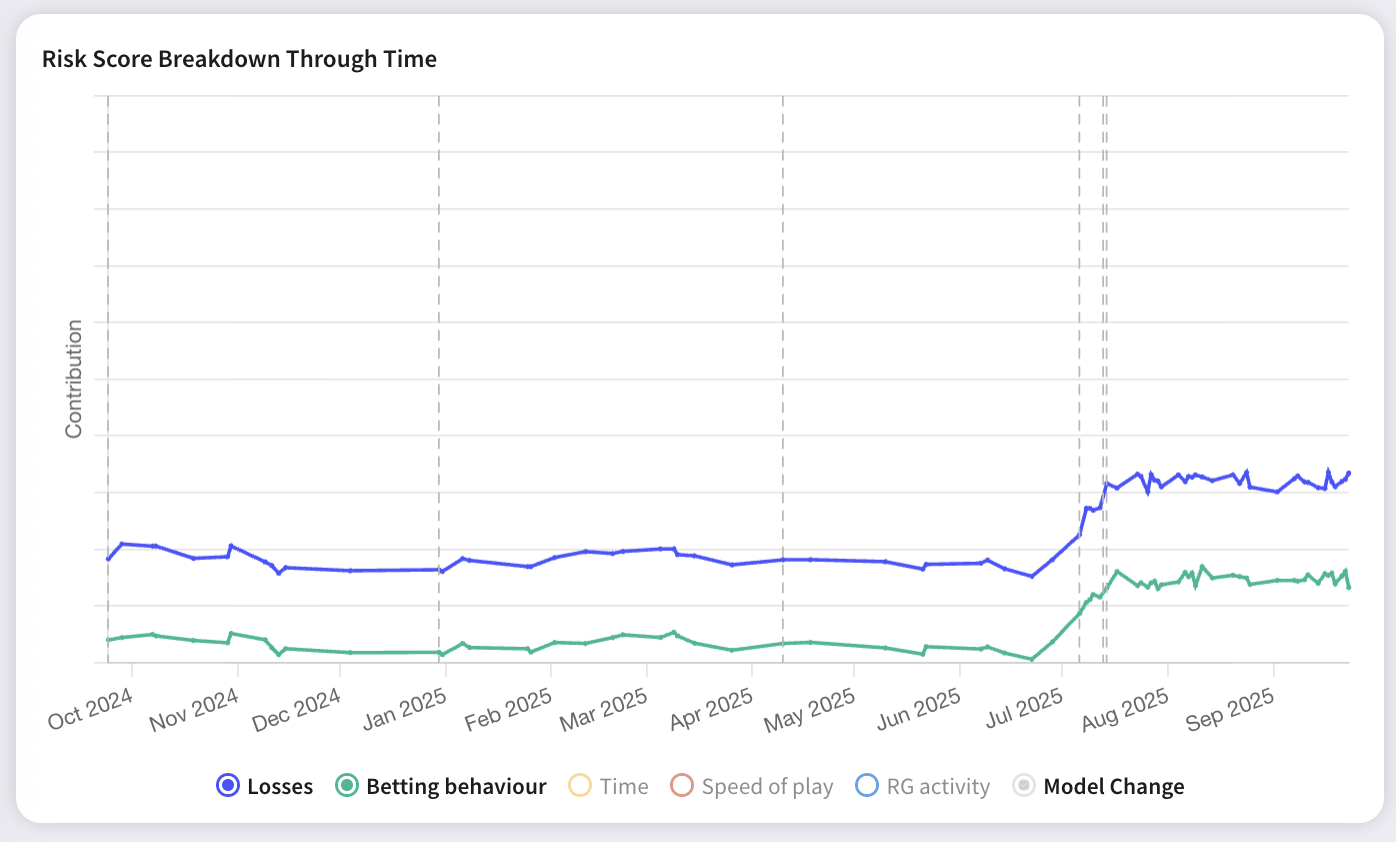
* Risk Score Breakdown Through Time
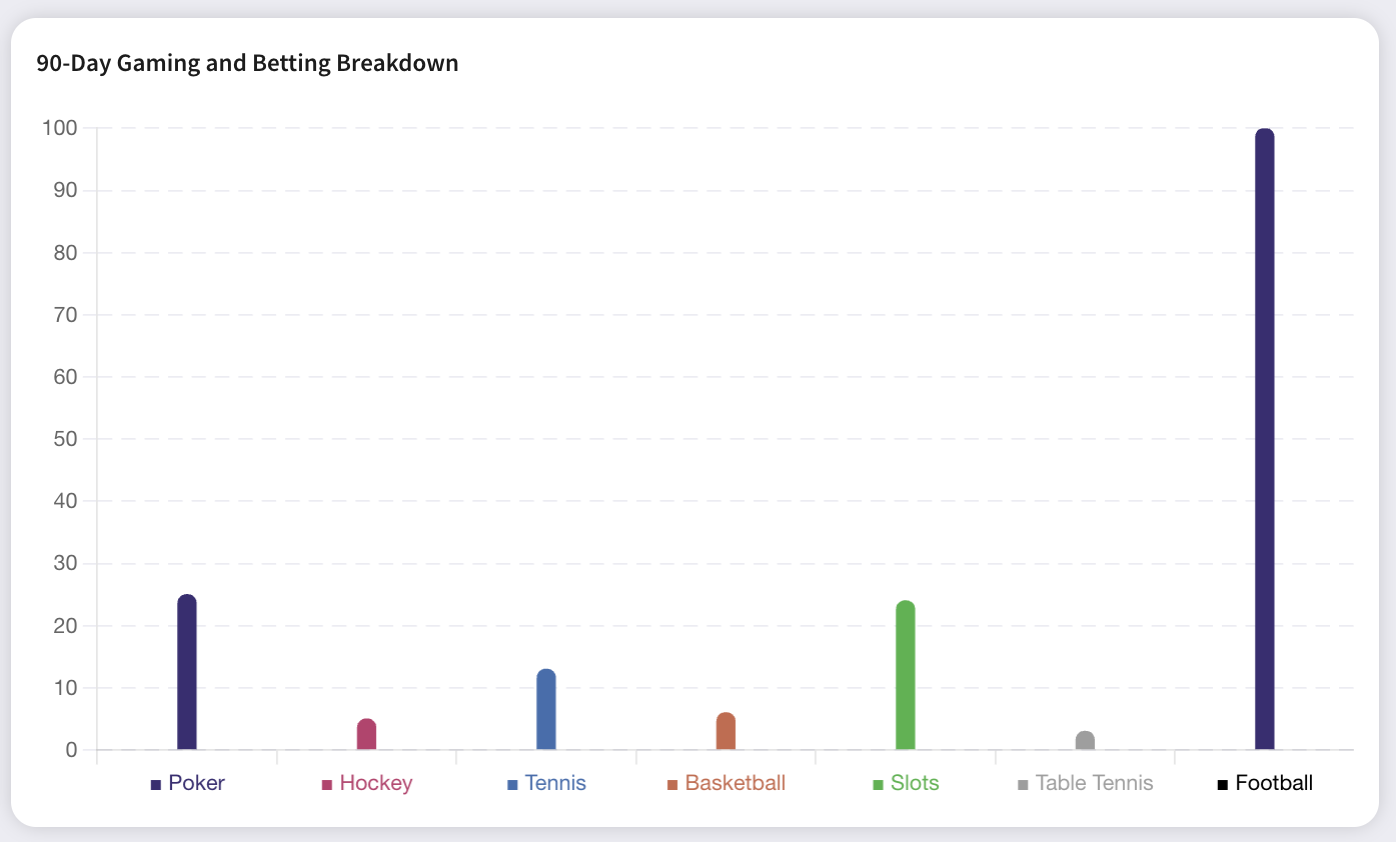
* Sports Breakdown
### Basic info
Displays basic information about the player.
This section also contains **Player Status**.
Player Status is analyst-assigned operational metadata used to support RG team workflows.
Available statuses:
* **(none)**
* **Cleared**
* **Needs Review**
* **RG Intervention**
Player Status can only be changed in **Basic Info**.
The current status is also shown in the **Accounts** listing.
Each status includes a timestamp showing when it was last set.
Player Status does not affect the AI model or the player's Risk score.
Last activity date is the most recent date on which the player had any betting activity.
### Risk score
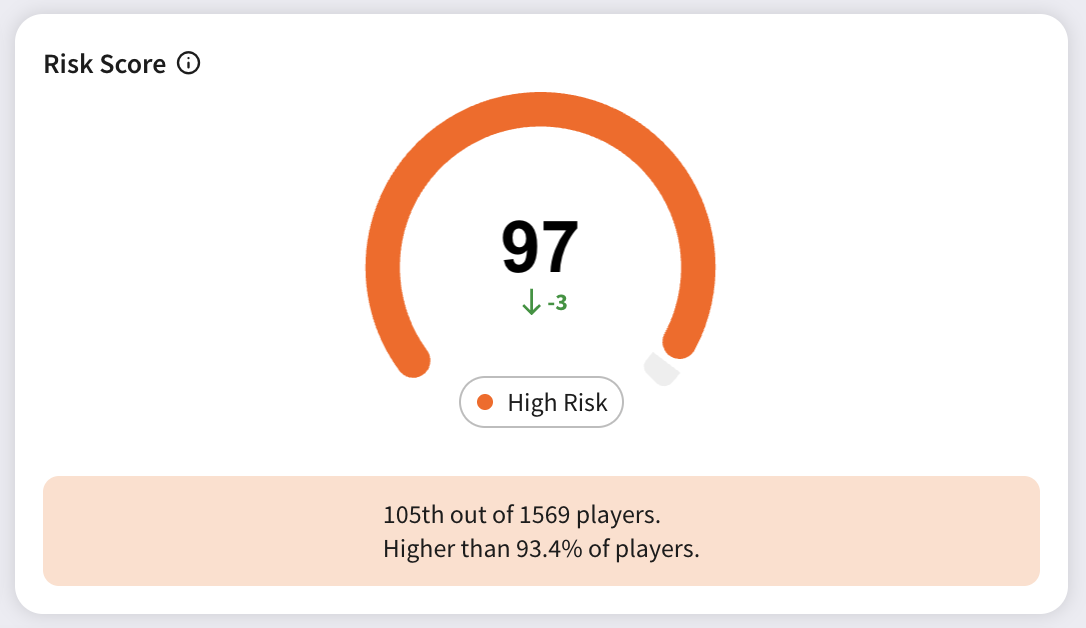
Shows the player's risk score, indicating the severity of their gambling behavior.
The **Risk score** is measured on a scale from **1 to 100**. It indicates the severity of the player’s gambling behavior. Players with higher scores exhibit more patterns of problematic gambling.
Based on the Risk score, each player is assigned a Risk category based on the following ranges:
| Category name | Risk score value range |
| -------------- | ---------------------- |
| No risk | < 50 |
| Low risk | \[50, 68) |
| Medium risk | \[68, 95) |
| High risk | \[95, 99) |
| Very high risk | \[99, 100) |
In addition to the daily risk score, the player view also includes a **suggested intervention** based on the feature group contributing most to the player’s current risk level. These suggestions are only shown for players classified as **Medium Risk or higher**.
{% hint style="warning" %}
**Please note:**
The final decision and execution of any intervention strategy remains the responsibility of the bookmaker.
{% endhint %}
To support more personalized communication, the widget also highlights the **top three contributing metrics** where the player ranks in the **highest percentiles** compared to others. These insights can be used to tailor messaging and better explain the reasoning behind the intervention.
### Risk score explanation
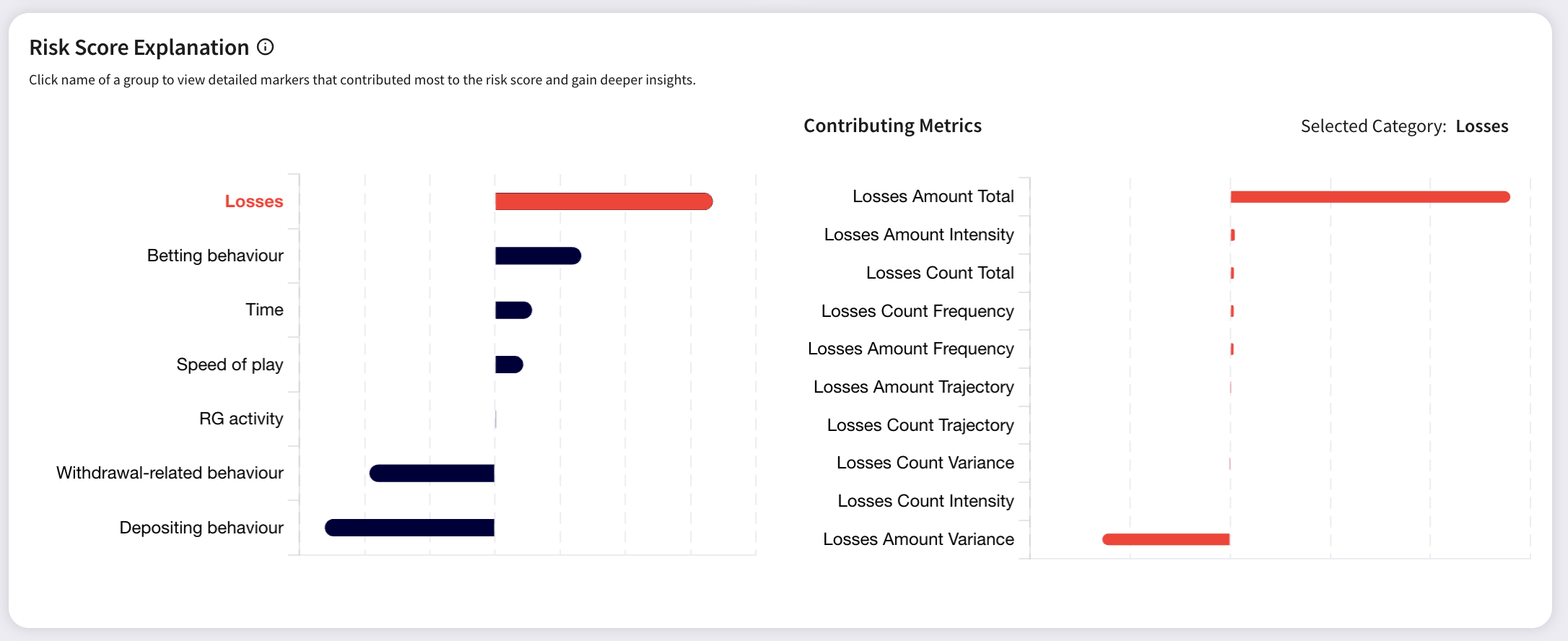
Helps identify which areas contributed the most to the player’s risk score.
To further contribute to the explainability of the Risk score, the actual contribution to it is broken down into 7 different groups. Below you can find some examples of metrics for each.
| Groups | Examples of metrics |
| --------------------------- | ----------------------------------- |
| Betting behavior | Tickets placed, turnover etc |
| Depositing behavior | Deposits, deposit amount etc. |
| Withdrawal-related behavior | Withdrawals, withdrawal amount etc. |
| Speed of play | Live tickets, live stake etc. |
| Time | Active hours |
| Losses | Losses, tickets lost etc. |
| RG Activity | Limit changes |
The values can be positive or negative:
* The positive values influence the model in a »positive manner«, that is, they add to the model output. In other words: »They increase the likelihood that someone is a problematic gambler.«
* The negative values influence the model in a »negative manner«, they subtract from the model output. Or: »They decrease the likelihood that someone is a problematic gambler.«
The left chart identifies groups that contributed the most, while the right part shows detailed markers within the selected group that contributed most to the risk score. The group that contributes the most is selected by default. You can switch between groups by clicking on their name.
### Player insights
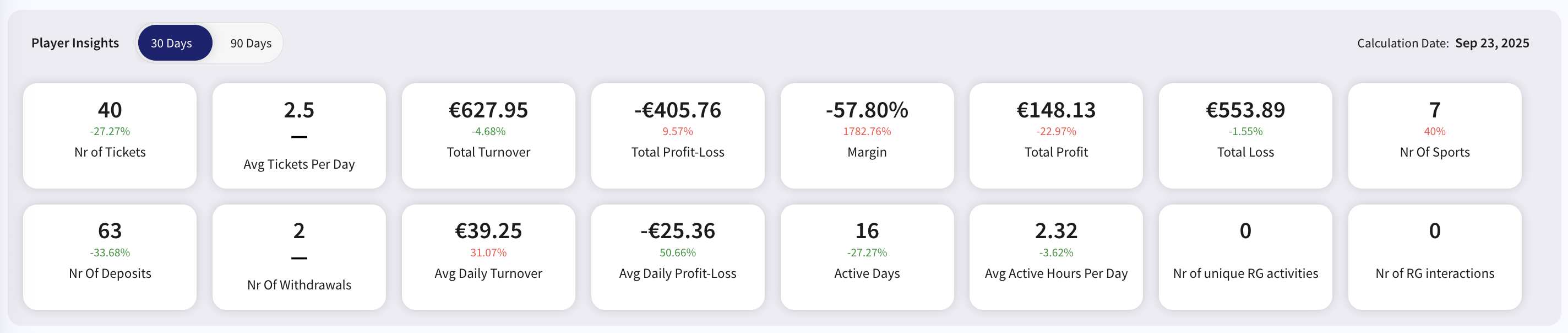
Displays key insights into the player's activity over a selected time period (30 or 90 days) with relative comparison to the preceding period (for 30 days, it's compared to the 30 days prior to that period):
* **Nr of Tickets** counts the number of tickets in the selected time period.
* **Avg Tickets Per Day** is the average number of tickets per active day in the selected time period.
* **Total Turnover** is the sum of the player's stakes in the selected time period.
* **Total Profit-Loss** is the total profit minus total loss from the bookmaker's perspective (a positive value indicates the bookmaker's profit).
* Positive Total Profit indicates the amount of money the bookmaker won from the player, while a negative amount indicates the amount lost by the bookmaker to the player.
* **Nr of Sports** counts the number of different sports where the player placed bets in the selected time period.
* **Nr of Deposits** and **Nr of Withdrawals** count the number of successful deposits/withdrawals the player made in the selected time period.
* **Avg Daily Turnover** is the average turnover per active day in the selected time period.
* **Avg Daily Profit-Loss** is the average profit-loss per active day in the selected time period.
* **Active Days** are the number of days with betting activity in the selected time period.
* **Avg Active Hours Per Day** is the number of hours active per active day.
* **\*RG Activity** counts the number of unique RG activities that a player has taken in the respective period.
* **\*RG Interactions** counts the number of interactions with all RG activities that a player has taken (repeating the same RG activity, e.g., weekly limit, counts every time for this field, but only once for the RG Activity).
All data is grouped into daily timeframes based on UTC, it's not localized.
*\*Available only for Bettor Sense Premium.*
### Activity log and Risk score over time
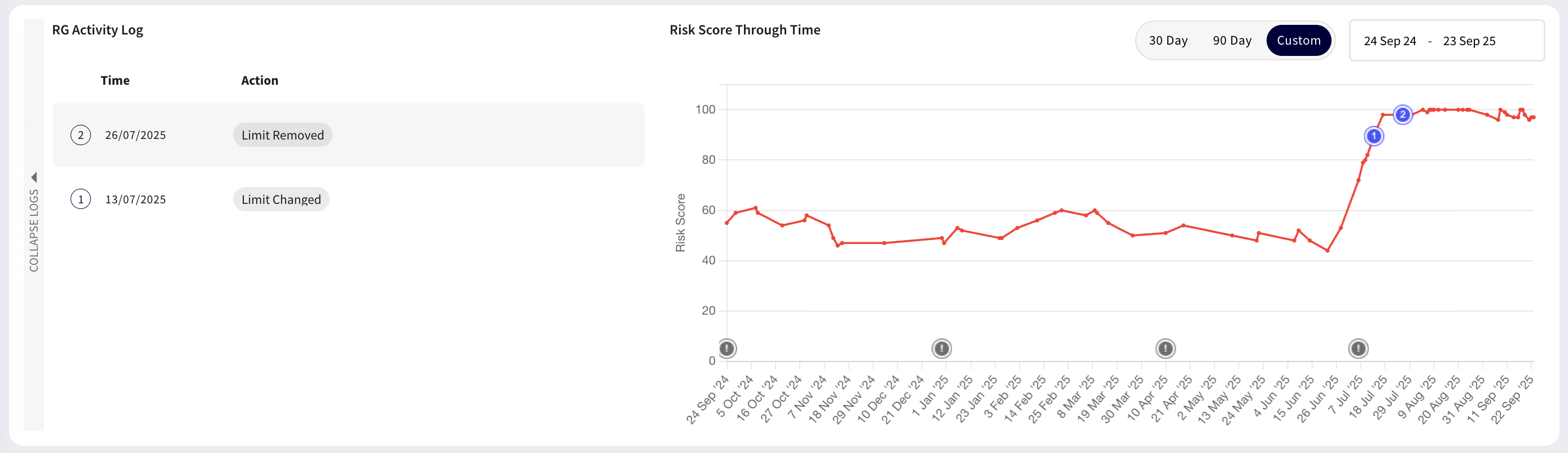
Risk score through time shows the player's risk score over the selected time period (up to 12 months with the possibility to customize it).
Model version changes are indicated with a grey info icon.
There are indicated activity log entries on the chart as well as interventions initiated by the bookmaker:
* **\*Activity log entries** - are indicated in the log and on the chart with corresponding index numbers in blue icons.
* **\*Interventions** - are indicated on the chart with exclamation icons in red icons.
*\*Available only for Bettor Sense Premium.*
*\*\*All dates and times are in UTC.*\_
### Risk score breakdown over time
This widget provides a visual timeline of how a player’s risk score evolves over time, along with the feature groups contributing to those changes.
You can toggle individual groups on or off by clicking on them in the legend below the chart, allowing for a more focused or comprehensive view depending on your needs.
### Sports breakdown
Displays the player's bets breakdown by sports over the past 30 days.
Bet builder selections are currently not considered and are listed as N/A in the chart.
---
# Agent Instructions
This documentation is published with GitBook. GitBook is the documentation platform designed so that both humans and AI agents can read, navigate, and reason over technical content effectively. Learn more at gitbook.com.
## Querying This Documentation
If you need additional information that is not directly available in this page, you can query the documentation by asking a question.
Perform an HTTP GET request on the following URL with the `ask` and `goal` query parameters:
```
GET https://docs.sportradar.com/bettor-sense/bettor-sense-user-interface/account-details.md?ask=&goal=
```
`ask` is the immediate question: it should be specific, self-contained, and written in natural language.
`goal` is what the user is ultimately trying to achieve, the reason they need the answer. Sharing it helps GitBook give you a better, more relevant answer. A goal is most helpful when it describes the outcome the user wants rather than restating the question. For example, with `ask=how do I create an API token`, a goal like `automate deployments from our CI pipeline` lets GitBook tailor the answer to that use case.
The response will contain a direct answer to the question and relevant excerpts and sources from the documentation.
Use this mechanism when the answer is not explicitly present in the current page, you need clarification or additional context, or you want to retrieve related documentation sections.