> For the complete documentation index, see [llms.txt](https://docs.sportradar.com/llms.txt). Markdown versions of documentation pages are available by appending `.md` to page URLs; this page is available as [Markdown](https://docs.sportradar.com/ads/third-party-connections-and-integrations/google-tag-manager-knowledge-base.md).
# Google Tag Manager Knowledge Base
## **Introduction**
This document suggests the implementation of Google Tag Manager (GTM) as a tool for managing tracking tags on your website. GTM provides a convenient way to centralize and streamline the deployment of various scripts. However SPORTRADAR does not own or cooperate with GTM, the decision to adopt GTM is entirely at your discretion. While technical specifications herein outline the recommended practices for GTM integration, we understand that individual project requirements and preferences may vary. You are not obligated to follow these recommendations verbatim, and alternative approaches to tracking management are fully acceptable.
## **Technical Architecture**
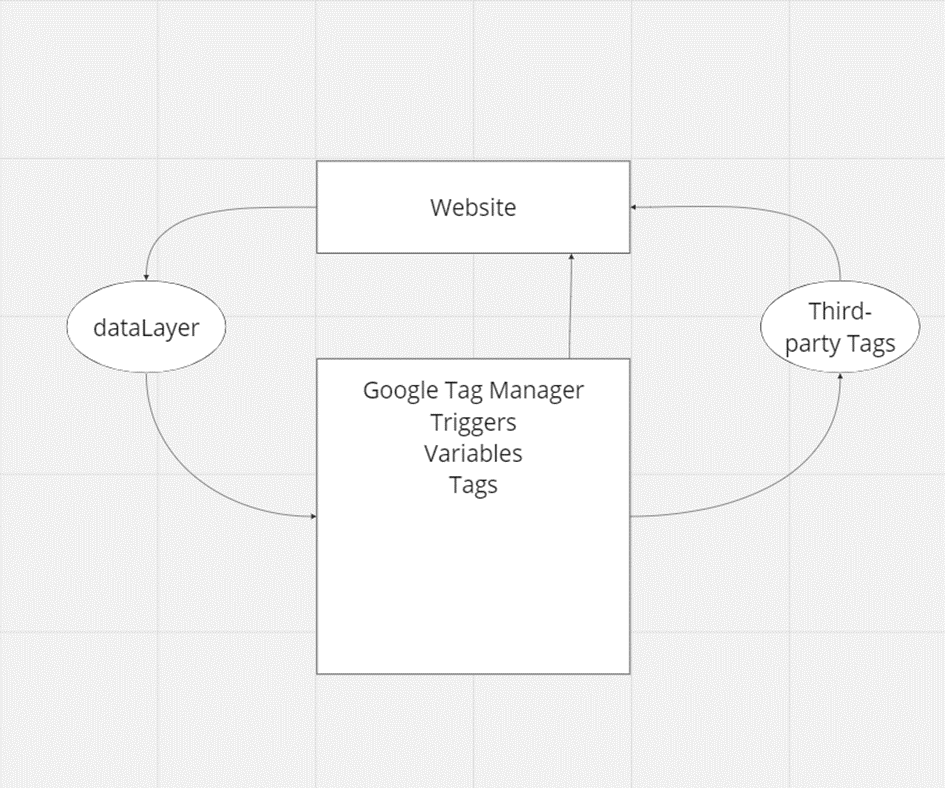
The technical architecture for the integration of Google Tag Manager (GTM) with the website is designed to streamline the management and deployment of tracking codes, ensuring efficient data capture and analytics. The architecture consists of key components, including the website, GTM, a DataLayer, Tags, Triggers, Variables, and integration with third-party services.
The website serves as the foundation of the architecture, representing the digital platform where user interactions and events occur. Various pages, actions, and transactions on the website generate data that needs to be tracked for analysis and reporting.
Adjacent to the website, Google Tag Manager acts as the central hub for managing and deploying tracking codes. GTM provides a user-friendly interface for configuring Tags, Triggers, and Variables, offering a dynamic and flexible approach to data tracking. The seamless integration of GTM with the website facilitates efficient data capture and enhances the ability to adapt to evolving tracking requirements.
The DataLayer serves as a critical component for communication between the website and GTM. It acts as a data container, capturing essential information about user interactions, events, and transactions. The DataLayer ensures a standardized and organized flow of data, allowing for the transmission of structured information from the website to GTM.
Within GTM, Tags, Triggers, and Variables work in tandem to capture and process data from the DataLayer. Tags represent the specific tracking codes or scripts deployed on the website, Triggers define the conditions under which Tags should be fired, and Variables store dynamic values used in Tag configurations. This modular setup within GTM enables precise control over the data to be collected and transmitted to third-party services.
The integration with third-party services, such as Google Analytics or Facebook Pixel, extends the functionality of the architecture. GTM facilitates the transmission of relevant data to these services, enabling comprehensive analysis of user behavior, conversion events, and other key metrics.
The flow of communication begins with user interactions on the website, triggering events that populate the DataLayer with relevant information. GTM, through its Tags, Triggers, and Variables, captures and processes this data, subsequently transmitting it to configured third-party services for in-depth analysis. The DataLayer acts as the conduit, ensuring a structured and consistent flow of data between the website and GTM.
## **Purpose and Scope**
The purpose is to implement Google Tag Manager to streamline the deployment and management of tracking codes. This includes tracking user interactions, conversion events, and other relevant data. The scope includes all pages of the website and specific events deemed essential for campaigns. Events used by Sportradar:
1. **Page View Events**:\
\- Capture data on all pages of the website, this includes: Home page, Landing pages, Match pages, game pages, registration form etc.
2. **Registration Events:**\
\- Registration Started: Track when a user initiates the registration process.\
\- Registration Finished: Track when a user successfully completes the registration process.
3. **Login Event**:\
\- Track when a user logs into the website.
4. **Deposit Events**:\
\- First Time Deposit: Track when a user makes their initial deposit.\
\- Recurring Deposit: Track subsequent deposits made by users.
5. **Betting Events**:\
\- Visiting Specific Match Page: Track visits to specific match pages.\
\- Bet Slip: Track matches inside bet slip.\
\- Bet Placed: Track when a users places a bet.
6. **Casino Events**:\
\- Casino Game Detail: Track when a users visits casino game detail.\
\- Casino Game Launch: Track when a user launches a casino game.
Please note that this is **a suggested scope, and adjustments can be made based on the specific needs**. The dataLayer implementation can be tailored to cover additional events or be refined to align with the unique characteristics and capabilities of your website.
## **Functional Requirements**
This section outlines suggested functional requirements for the implementation of GTM, below mentioned events are used in Sportradar Programmatic and DCO campaigns. It is important to note that these recommendations serve as a foundation, and you can customize and extend the functionality based on your specific needs.
1. **Requirement ID**: FT0001\
-Description: Implement Google Tag Manager container code snippet into \ section of the website and into \ section of the website.\
-Acceptance Criteria: Verify GTM container is present in the website’s source code and dataLayer is loading on all pages.
2. **Requirement ID**: FT0002\
-Description: Capture data when a user initiates the registration process.\
-Acceptance Criteria: Implement the ‘registrationStarted’ dataLayer event.
3. **Requirement ID**: FT0003\
-Description: Capture data when a user successfully completes registration process.\
-Acceptance Criteria: Implement the ‘registrationFinished’ dataLayer event with required parameters such as userId.
4. **Requirement ID**: FT0004\
-Description: Capture data when a user logs into his account.\
-Acceptance Criteria: Implement the ‘login’ dataLayer event with required parameters such as userId.
5. **Requirement ID**: FT0005\
-Description: Capture data when a user makes their successful initial deposit.\
-Acceptance Criteria: Implement the ‘firstTimeDeposit’ dataLayer event with required parameters such as userId.\
-Optional: Include additional information about deposit such as: deposit amount, currency, transactionId.
6. **Requirement ID**: FT0006\
-Description: Capture data when a user makes their successful subsequent deposits.\
-Acceptance Criteria: Implement the ‘recurringDeposit’ dataLayer event with required parameters such as userId.\
-Optional: Include additional information about deposit such as: deposit amount, currency, transactionId.
7. **Requirement ID**: FT0007\
-Description: Capture data when a user places a bet.\
-Acceptance Criteria: Implement the ‘betPlaced’ dataLayer event with required parameters such as userId.\
-Optional: Include additional information about bets such as: bet amount, currency, transactionId, matchIds.
8. **Requirement ID**: FT0008\
-Description: Capture data when a user visits specific match page.\
-Acceptance Criteria: Implement the ‘visitMatchPage’ dataLayer event with required parameters such as match\_id, team\_home\_name, team\_away\_name, tournament\_name, scheduled, sport, odds\_home, odds\_away, odds\_draw, language\
-Optional: Include additional information about a match such as: sr\_match\_id, team\_home\_name\_short, team\_away\_name\_short, team\_home\_logo, team\_away\_logo, status.
9. **Requirement ID**: FT0009\
-Description: Capture data when a user adds a match to his bet slip.\
-Acceptance Criteria: Implement the ‘betSlipEvent’ dataLayer event with required parameters such as match\_id, team\_home\_name, team\_away\_name, tournament\_name, scheduled, sport, odds\_home, odds\_away, odds\_draw, language\
-Optional: Include additional information about a match such as: sr\_match\_id, team\_home\_name\_short, team\_away\_name\_short, team\_home\_logo, team\_away\_logo, status.
10. **Requirement ID**: FT0010\
-Description: Capture data when a user visits casino game detail page.\
-Acceptance Criteria: Implement the ‘casinoGameDetail’ dataLayer event with required parameters such as id, name, category, image\
-Optional: Include additional information about a match such as: provider.id, provider.game\_id, jackpot.size, jackpot.currency\_code.
11. **Requirement ID**: FT0011\
-Description: Capture data when a user launches a casino game.\
-Acceptance Criteria: Implement the ‘casinoGameLaunch’ dataLayer event with required parameters such as id, name, category, image\
-Optional: Include additional information about a match such as: provider.id, provider.game\_id, jackpot.size, jackpot.currency\_code.
## **Dependencies**
**Third-Party Payment Providers**: Some websites utilize third-party payment providers for handling deposits and transactions. This deems deposit dataLayers event unusable. As the deposit is happening off-site where GTM container is not being loaded.\
**Custom Features and Pages**: Some Casino Game providers do not provide casino game detail, or if this page is not available. Rely on utilizing Casino Game Launch dataLayer event instead.
## **Data Model**
To optimize the effectiveness of your GTM setup, **it is strongly recommended to collaborate with your Front-End developer or platform provider during the implementation of dataLayer events.** The dataLayer, a crucial component for capturing user interactions, benefits from the expertise of your Front-End developer in seamlessly integrating events into the website’s codebase.
**DataLayer Event**: 'registrationStarted'
```javascript
window.dataLayer = window.dataLayer || [];
window.dataLayer.push({
'event': 'registrationStarted'
// Include any other variables that you find useful inside the 'data' object
});
```
**DataLayer Event**: 'registrationFinished'
**Parameters**:
-‘userId’(String): hashed unique user identifier
```javascript
window.dataLayer = window.dataLayer || [];
window.dataLayer.push({
'event': 'registrationFinished',
'data': {
'userId': 'provide_value_for_userId'
// Include any other variables that you find useful inside the 'data' object
}
});
```
**DataLayer Event**: ‘login’\
**Parameters**:
-‘userId’(String): hashed unique user identifier
```javascript
window.dataLayer = window.dataLayer || [];
window.dataLayer.push({
'event': 'login',
'data': {
'userId': 'provide_value_for_userId'
// Include any other variables that you find useful inside the 'data' object
}
});
```
**DataLayer Event**: ‘firstTimeDeposit’\
**Parameters**:\
-‘userId’(String): hashed unique user identifier\
-‘deposit amount’(String): deposit amount number\
-‘currency’(String): 3 letter ISO example: EUR\
-‘transactionId’(String): hashed unique identifier of transaction
```javascript
window.dataLayer = window.dataLayer || [];
window.dataLayer.push({
'event': 'firstTimeDeposit',
'data': {
'userId': 'provide_value_for_userId',
'deposit_amount': 'provide_value_for_deposit_amount',
'currency': 'provide_value_for_currency',
'transactionId': 'provide_value_for_transactionId'
// Include any other variables that you find useful inside the 'data' object
}
});
```
**DataLayer Event**: ‘recurringDeposit’\
**Parameters**:\
-‘userId’(String): hashed unique user identifier\
-‘deposit amount’(String): deposit amount number\
-‘currency’(String): 3 letter ISO example: EUR\
-‘transactionId’(String): hashed unique identifier of transaction
```javascript
window.dataLayer = window.dataLayer || [];
window.dataLayer.push({
'event': 'recurringDeposit',
'data': {
'userId': 'provide_value_for_userId',
'deposit_amount': 'provide_value_for_deposit_amount',
'currency': 'provide_value_for_currency',
'transactionId': 'provide_value_for_transactionId'
// Include any other variables that you find useful inside the 'data' object
}
});
```
**DataLayer Event**: ‘betPlaced’\
**Parameters**:\
-‘userId’(String): hashed unique user identifier\
-‘bet amount’(String): bet amount number\
-‘currency’(String): 3 letter ISO example: EUR\
-‘transactionId’(String): hashed unique identifier of transaction\
-‘contentIds’(Array of String): array of match ids
```javascript
window.dataLayer = window.dataLayer || [];
window.dataLayer.push({
'event': 'betPlaced',
'data': {
'userId': 'provide_value_for_userId',
'bet_amount': 'provide_value_for_bet_amount',
'currency': 'provide_value_for_currency',
'transactionId': 'provide_value_for_transactionId',
'contentIds': ['provide_value_for_contentId']
// Include any other variables that you find useful inside the 'data' object
}
});
```
**DataLayer Event**: ‘visitMatchPage’\
**Parameters**:\
-‘match\_id(String): identifier of match\
-‘sr\_match\_id’(String): Sportradar match id (if using SR sportsbook)\
-‘team\_home\_name’(String): name of home team\
-‘team\_home\_name\_short’(String): short name of home team\
-‘team\_home\_logo’(String): url of image where image is hosted\
-‘team\_away\_name’(String): name of away team\
-‘team\_away\_name\_short’(String): short name of away team\
-‘team\_away\_logo’(String): url of image where image is hosted\
-‘scheduled’(String): ISO 8601 date and time of when match is scheduled\
-‘status’(String): Status of the match\
-‘tournament\_name’(String): name of the tournament\
-‘sport’(String):what type of sport soccer,basketball etc.\
-‘odds\_home’(String): number as a string\
-‘odds\_draw’(String): number as a string\
-‘odds\_away’(String): number as a string\
-‘language’(String): ISO 839-1 example: en
```javascript
window.dataLayer = window.dataLayer || [];
window.dataLayer.push({
'event': 'visitMatchPage',
'data': {
'match_id': 'provide_value_for_match_id',
'sr_match_id': 'provide_value_for_sr_match_id',
'team_home_name': 'provide_value_for_team_home_name',
'team_home_name_short': 'provide_value_for_team_home_name_short',
'team_home_logo': 'provide_value_for_team_home_logo',
'team_away_name': 'provide_value_for_team_away_name',
'team_away_name_short': 'provide_value_for_team_away_name_short',
'team_away_logo': 'provide_value_for_team_away_logo',
'scheduled': 'provide_value_for_scheduled',
'status': 'provide_value_for_status',
'tournament_name': 'provide_value_for_tournament_name',
'sport': 'provide_value_for_sport',
'odds_home': 'provide_value_for_odds_home',
'odds_draw': 'provide_value_for_odds_draw',
'odds_away': 'provide_value_for_odds_away',
'language': 'provide_value_for_language'
// Include any other variables that you find useful inside the 'data' object
}
});
```
**DataLayer Event**: ‘betSlipEvent’\
**Parameters**:\
-‘match\_id(String): identifier of match\
-‘sr\_match\_id’(String): Sportradar match id (if using SR sportsbook)\
-‘team\_home\_name’(String): name of home team\
-‘team\_home\_name\_short’(String): short name of home team\
-‘team\_home\_logo’(String): url of image where image is hosted\
-‘team\_away\_name’(String): name of away team\
-‘team\_away\_name\_short’(String): short name of away team\
-‘team\_away\_logo’(String): url of image where image is hosted\
-‘scheduled’(String): ISO 8601 date and time of when match is scheduled\
-‘status’(String): Status of the match\
-‘tournament\_name’(String): name of the tournament\
-‘sport’(String):what type of sport soccer,basketball etc.\
-‘odds\_home’(String): number as a string\
-‘odds\_draw’(String): number as a string\
-‘odds\_away’(String): number as a string\
-‘language’(String): ISO 839-1 example: en
```javascript
window.dataLayer = window.dataLayer || [];
window.dataLayer.push({
'event': 'betSlipEvent',
'data': {
'match_id': 'provide_value_for_match_id',
'sr_match_id': 'provide_value_for_sr_match_id',
'team_home_name': 'provide_value_for_team_home_name',
'team_home_name_short': 'provide_value_for_team_home_name_short',
'team_home_logo': 'provide_value_for_team_home_logo',
'team_away_name': 'provide_value_for_team_away_name',
'team_away_name_short': 'provide_value_for_team_away_name_short',
'team_away_logo': 'provide_value_for_team_away_logo',
'scheduled': 'provide_value_for_scheduled',
'status': 'provide_value_for_status',
'tournament_name': 'provide_value_for_tournament_name',
'sport': 'provide_value_for_sport',
'odds_home': 'provide_value_for_odds_home',
'odds_draw': 'provide_value_for_odds_draw',
'odds_away': 'provide_value_for_odds_away',
'language': 'provide_value_for_language'
// Include any other variables that you find useful inside the 'data' object
}
});
```
**DataLayer Event**: ‘casinoGameDetail’\
**Parameters**:\
-‘id’(String): identifier of game\
-‘name’(String): name of the game\
-‘category’(String): category of the game (slots, live games etc.)\
-‘image’(String): url where image is hosted\
-‘provider.id’(String): id of provider\
-‘provider.game\_id’(String): id of the game from provider\
-‘jackpot.size’(String): jackpot amount number as a string\
-‘jackpot.currency’(String): currency in which jackpot is displayed
```javascript
window.dataLayer = window.dataLayer || [];
window.dataLayer.push({
'event': 'casinoGameDetail',
'data': {
'id': 'provide_value_for_id',
'name': 'provide_value_for_name',
'category': 'provide_value_for_category',
'image': 'provide_value_for_image',
'provider': {
'id': 'provide_value_for_provider_id',
'game_id': 'provide_value_for_game_id'
},
'jackpot': {
'size': 'provide_value_for_jackpot_size',
'currency': 'provide_value_for_jackpot_currency'
}
// Include any other variables that you find useful inside the 'data' object
}
});
```
**DataLayer Event**: ‘casinoGameLaunch’\
**Parameters**:\
-‘id’(String): identifier of game\
-‘name’(String): name of the game\
-‘category’(String): category of the game (slots, live games etc.)\
-‘image’(String): url where image is hosted\
-‘provider.id’(String): id of provider\
-‘provider.game\_id’(String): id of the game from provider\
-‘jackpot.size’(String): jackpot amount number as a string\
-‘jackpot.currency’(String): currency in which jackpot is displayed
```javascript
window.dataLayer = window.dataLayer || [];
window.dataLayer.push({
'event': 'casinoGameLaunch',
'data': {
'id': 'provide_value_for_id',
'name': 'provide_value_for_name',
'category': 'provide_value_for_category',
'image': 'provide_value_for_image',
'provider': {
'id': 'provide_value_for_provider_id',
'game_id': 'provide_value_for_game_id'
},
'jackpot': {
'size': 'provide_value_for_jackpot_size',
'currency': 'provide_value_for_jackpot_currency'
}
// Include any other variables that you find useful inside the 'data' object
}
});
```
## **Testing Requirements**
**Requirement ID**: TST0001\
**Description**: Ensure that all dataLayer events are fired accurately in response to user action on the website.\
**Acceptance Criteria**: Verify that the dataLayer events are triggered promptly following user interactions. Confirm that the event payload includes the expected parameters and values. Validate that the dataLayer events are firing consistently across various pages and user journeys.
## **Conclusion and Implementation Guidelines**
In conclusion, these specifications aim to guide the implementation of GTM, offering a framework for effective data tracking and analytics. It’s essential to highlight that the ownership of the entire implementation process, including testing and ongoing management, lies in your capable hands.
The provided functional requirements serve as a starting point for your GTM setup. Tailor these recommendations to align with your specific business goals, ensuring that the tracking solution is finely tuned to capture the data that matter most to your organization.
GTM offers a high degree of flexibility. Leverage this flexibility to introduce custom events, variables, triggers, and additional enhancements that cater to the dynamic nature of your website and business objectives.
For a more in-depth understanding of GTM and its capabilities, we recommend referring to official Google Tag Manager documentation and resources. Additionally, sources like Analytics Mania can provide valuable insights into advanced features, best practices, and troubleshooting tips.\
\
Source: \
---
# Agent Instructions
This documentation is published with GitBook. GitBook is the documentation platform designed so that both humans and AI agents can read, navigate, and reason over technical content effectively. Learn more at gitbook.com.
## Querying This Documentation
If you need additional information that is not directly available in this page, you can query the documentation by asking a question.
Perform an HTTP GET request on the following URL with the `ask` and `goal` query parameters:
```
GET https://docs.sportradar.com/ads/third-party-connections-and-integrations/google-tag-manager-knowledge-base.md?ask=&goal=
```
`ask` is the immediate question: it should be specific, self-contained, and written in natural language.
`goal` is what the user is ultimately trying to achieve, the reason they need the answer. Sharing it helps GitBook give you a better, more relevant answer. A goal is most helpful when it describes the outcome the user wants rather than restating the question. For example, with `ask=how do I create an API token`, a goal like `automate deployments from our CI pipeline` lets GitBook tailor the answer to that use case.
The response will contain a direct answer to the question and relevant excerpts and sources from the documentation.
Use this mechanism when the answer is not explicitly present in the current page, you need clarification or additional context, or you want to retrieve related documentation sections.